From QEMU to Raspberry Pi to Jetson - one codebase, ultimate portability
qemux86-64raspberrypi5jetson-orin-nano-devkit0.41.1TL;DR - To prove how portable Avocado OS is across hardware targets, I took the nodejs-dashboard reference and ran it on a QEMU VM, a Raspberry Pi 5, and a Jetson Orin Nano. The only thing that changed between them was one line in avocado.yaml.
How this works
nodejs-dashboard is a Node.js reference: an Express app that serves a live single-page dashboard and a JSON API (/api/stats, /api/processes), reading metrics directly from /proc and /sys. There is no frontend build step - the app is plain Node.
The hardware target is specified in avocado.yaml.
default_target: 'qemux86-64'
and the board support package is templated on the active target:
extensions:
  avocado-bsp-{{ avocado.target.board }}:
    source:
      type: package
      version: '*'
To change from the QEMU VM to a Raspberry Pi 5, I changed one line:
default_target: 'raspberrypi5'
On the next build, that template resolves the Pi's board support package and the feed serves cortexa76 binaries plus Pi firmware. Nothing in the application source is touched. If you would rather not edit the file at all, supported_targets: '*' lets you pass --target on the command line instead.
Running the hardware gambit
Clone once, then repeat the same three-command loop per target, changing only default_target (and the provisioning profile, which follows the hardware class).
avocado init --reference nodejs-dashboard nodejs-dashboard
cd nodejs-dashboard
QEMU (qemux86-64) - the baseline, no hardware:
avocado install -f
avocado build
avocado provision -r dev
avocado sdk run -iE vm dev --host-fwd "2222-:22" --host-fwd "5000-:5000"
Then confirm the service and API from the host:
ssh -o StrictHostKeyChecking=no -p 2222 root@localhost systemctl is-active app

curl -s http://localhost:5000/api/stats
Then navigate to http://localhost:5000 to see the front end.
Raspberry Pi 5 (raspberrypi5) - a Broadcom Arm64 board. Set default_target: "raspberrypi5", then:
avocado install -f
avocado build
avocado provision -r dev --profile sd
Flash the SD card, boot, open http://<pi-ip>:5000. With a display attached, the on-device WebKit kiosk (cog) is already showing the dashboard full-screen.
NVIDIA Jetson Orin Nano (jetson-orin-nano-devkit) - also Arm64, but a completely different SoC and flash path. Set default_target: "jetson-orin-nano-devkit", then:
avocado install -f
avocado build
avocado provision -r dev --profile tegraflash
Follow the USB disconnect/reconnect prompts for the Tegra flash. armv8a_tegra234 silicon, Tegra firmware, a flash path that shares nothing with the SD boot - same app.
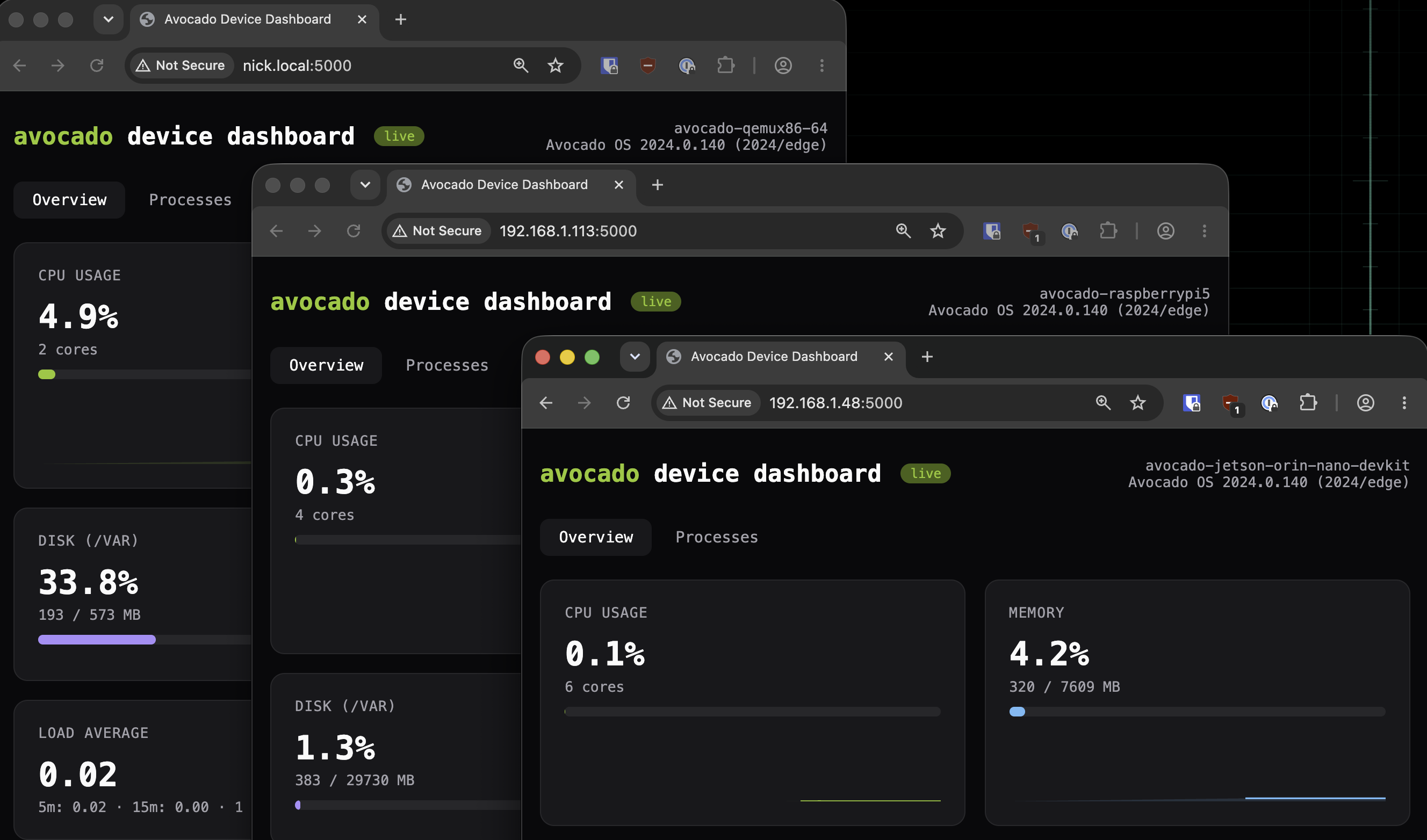
One source tree, three targets, live at once: QEMU (x86-64), Jetson Orin Nano (Tegra Arm64), and
Raspberry Pi 5 (Broadcom Arm64). Same app/ source, three architectures serving it
simultaneously.
Only one line code change between the QEMU run and the Jetson run
Why it works
- The application is a constant. Across three targets spanning x86-64 and two different Arm64 SoCs, the
app/source never changed. The backend is interpreted JavaScript and the build is just annpm install, so it is target-agnostic; the architecture-specific work is resolved from the feed, not done by hand. - Optimized to the silicon, not to the average. Each image is assembled from that target's own architecture repo (
cortexa76,armv8a_tegra234,core2_64), so nothing ships a fat, general-purpose image that a field device has to tolerate. There are no printer drivers on the robot because nothing put them there. - Board bytes stay isolated. Kernel, device tree, and firmware arrive as the BSP extension keyed to the target and never mix into the app layer, which is exactly why the app layer is reusable.
Compare that to bringing up a new Yocto MACHINE per board before the app runs at all, or to running a desktop-class Ubuntu image on a device that has no monitor and a tight boot budget.
Issues Encountered
- Node on device is a runtime, not a static binary. The app depends on
nodeand anode_modules/tree on the target, a larger footprint than a compiled single-binary reference. If footprint is the priority, a compiled-language reference is the better base. This is the honest cost of a JavaScript backend. - Only QEMU is verifiable without hardware. The software path (build, boot, API) runs on the host on every commit. The two boards each need a real provision-and-boot to prove their BSP and firmware resolve; the SD and Tegra flash paths cannot run in a pure-CI VM. The board screenshots above are that hardware-in-the-loop proof.
Reproduce it
Clone the nodejs-dashboard reference and run the QEMU pass end to end with only Docker and the Avocado CLI on your host. Then change default_target to raspberrypi5 or jetson-orin-nano-devkit, rerun install / build / provision, and diff avocado.yaml to confirm one line moved. Keep a terminal on each board running journalctl -u app -f to watch the same service log on every target.