Chatting a Prometheus exporter onto a Raspberry Pi 4 with Avocado Desktop
TL;DR - I asked Avocado Desktop's built-in agent, in one plain-English message, for a small Rust service to report my Raspberry Pi 4's health as Prometheus metrics. It found an existing reference on its own, generated a complete Avocado extension and cross-compiled it to aarch64, and after I flashed the SD card the Pi booted with systemd already serving the metrics over HTTP.
What this is
Avocado Desktop is the local tool that builds and provisions Avocado OS, Peridio's immutable embedded Linux runtime. Its developer preview ships a built-in AI agent: an agentic chat wired to the Avocado MCP, a Model Context Protocol server that exposes the whole toolchain (edit config, cross-compile, build the image, provision hardware) so you drive it by describing what you want.
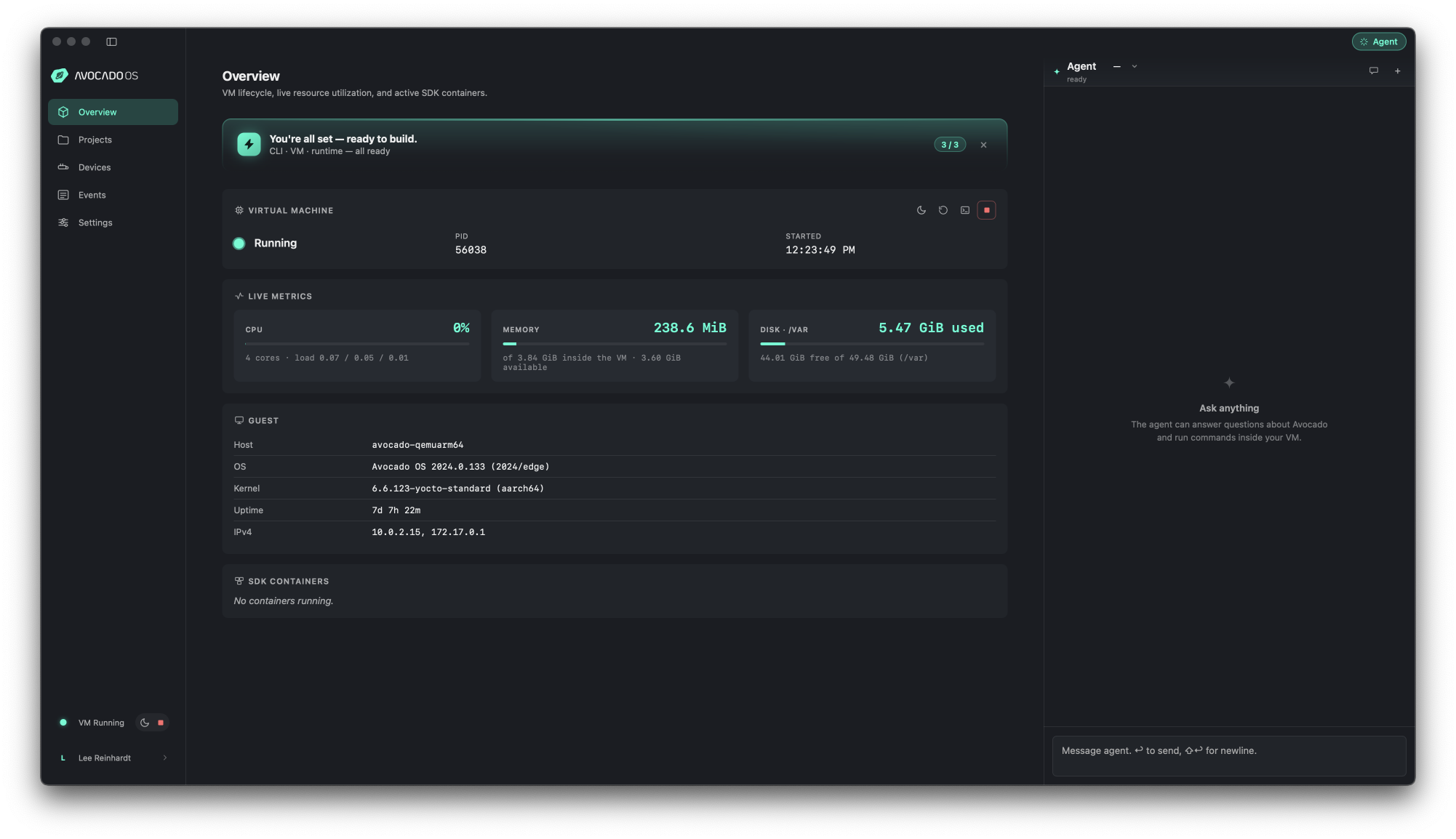
Avocado Desktop. The build VM and live metrics fill the main pane; the agent panel on the right is where the whole note happens.
This note is one run of that loop end to end. I described what I wanted in a single message and the agent produced a real Avocado extension that cross-compiled to aarch64 and booted on the board with the service already running. The point is not the exporter; it is that config, cross-compilation, packaging, and a first-boot systemd service all came out of the chat, and I never had to know an Avocado config key.
The prompt
I gave the agent one message. No file scaffolding, no config written by hand, and deliberately no Avocado-specific detail - I wrote it the way someone new to Avocado would:
I have a Raspberry Pi 4 and I'm new to Avocado. I'd like to build a small Rust
service that runs on the Pi and reports the device's health as Prometheus metrics
- CPU temperature, memory usage, uptime, and load average - on the standard
Prometheus port, plus a JSON status endpoint and a simple health check. It should
start automatically when the Pi boots. If there are existing Rust references or
examples for Avocado, use them as a guide.
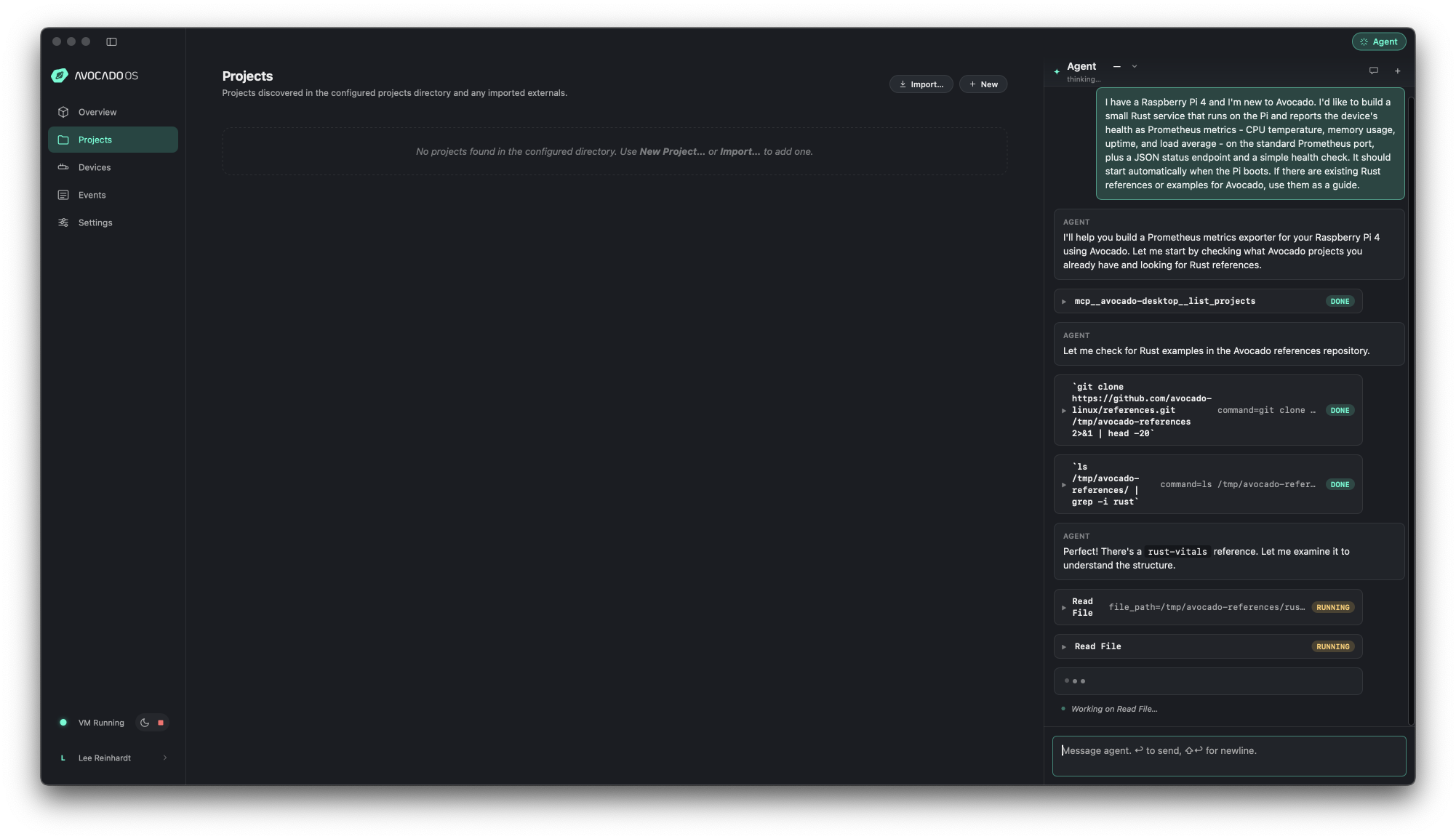
From that one prompt: the agent lists projects, clones the Avocado references repo, greps for
Rust, and finds rust-vitals itself, then starts mirroring it. You type in the chat;
it calls the Avocado MCP to run the toolchain.
What the agent produced
I never named a reference. From the prompt, the agent went looking: it listed my projects, cloned the Avocado references repo, and grepped it for Rust examples, which turned up rust-vitals. It read that reference and mirrored its cross-compilation setup. The load-bearing part of the generated avocado.yaml is the SDK toolchain and the sysroot-aware compile step - the thing that is easy to get wrong by hand:
extensions:
  pi-metrics:
    version: 0.1.0
    overlay: overlay
    enable_services:
      - pi-metrics.service
    on_merge:
      - systemctl restart --no-block pi-metrics.service
    packages:
      pi-metrics-app:
        compile: pi-metrics-app
        install: rust-install.sh
    sdk:
      packages:
        nativesdk-rust: '*'
        nativesdk-cargo: '*'
        nativesdk-gcc: '*'
        nativesdk-binutils: '*'
        nativesdk-glibc-dev: '*'
        nativesdk-libgcc-dev: '*'
        packagegroup-rust-cross-canadian-avocado-{{ avocado.target }}: '*'

sdk:
  compile:
    pi-metrics-app:
      compile: rust-compile.sh
      packages:
        libstd-rs: '*'
        libstd-rs-dev: '*'
It also set default_target: raspberrypi4 on its own - I never mentioned the key. The application is plain tiny_http reading straight from the kernel, no telemetry agent and no dependencies beyond the standard library and the HTTP server:
fn read_cpu_temp() -> f64 {
    fs::read_to_string("/sys/class/thermal/thermal_zone0/temp")
        .unwrap_or_default()
        .trim()
        .parse::<f64>()
        .unwrap_or(0.0)
        / 1000.0
}
It built on the first avocado build. The Rust cross-compilation to aarch64-avocado-linux-gnu produced a real ELF binary, not a prebuilt drop-in:
pi_metrics: ELF 64-bit LSB pie executable, ARM aarch64,
dynamically linked, interpreter /lib/ld-linux-aarch64.so.1, for GNU/Linux
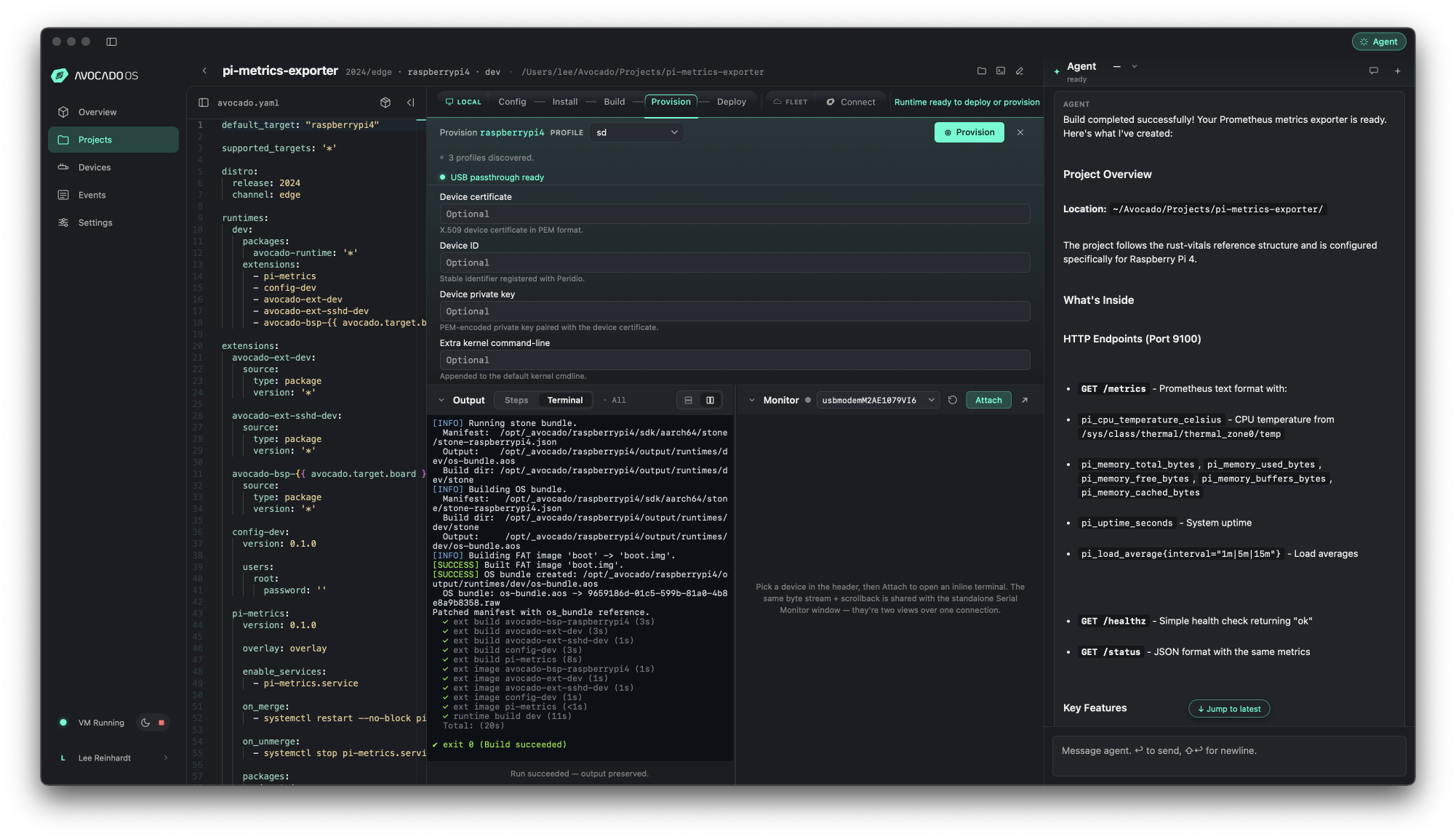
The agent's own summary: the avocado.yaml, the Rust app, the cross-compile scripts,
and the systemd service, all generated from the prompt. It notes the project "follows the
rust-vitals reference structure."
From one plain-English prompt to a cross-compiled aarch64 extension that systemd auto-started on the Pi, serving live metrics on port 9100.
Onto the Pi
Under the hood the agent ran the same steps you would run yourself, driven by the MCP:
avocado install
avocado build
avocado provision -r dev --profile sd
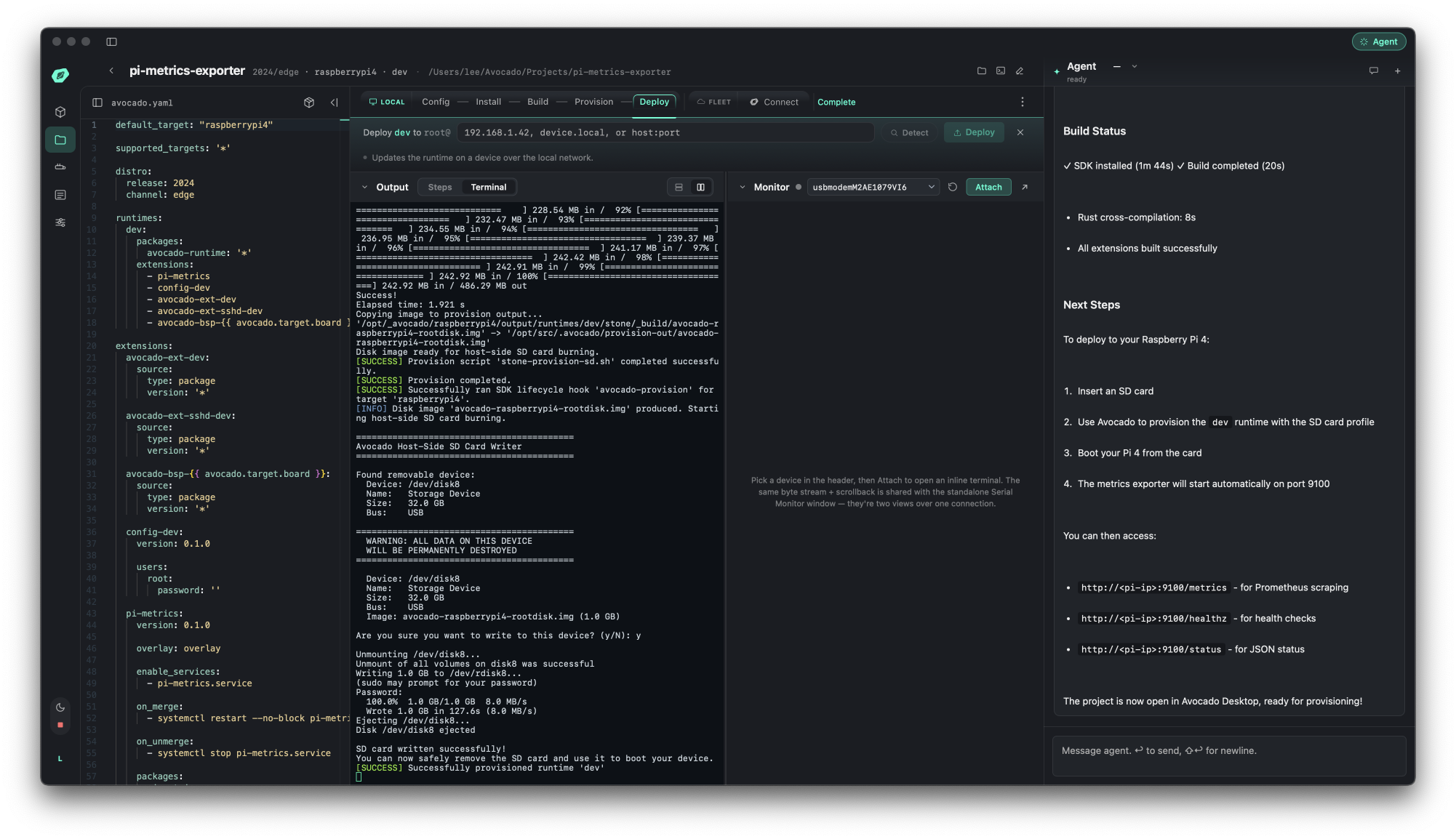
The Provision step: the raspberrypi4 target and the sd profile writing
the bootable card. "USB passthrough ready" lets Avocado Desktop write the SD directly.
The sd profile produced a bootable image and wrote it to the SD card. I moved the card to the Pi 4, attached a USB-UART cable at 115200 baud, and powered on. It booted through U-Boot into Avocado OS, and the extension's pi-metrics.service was already running.
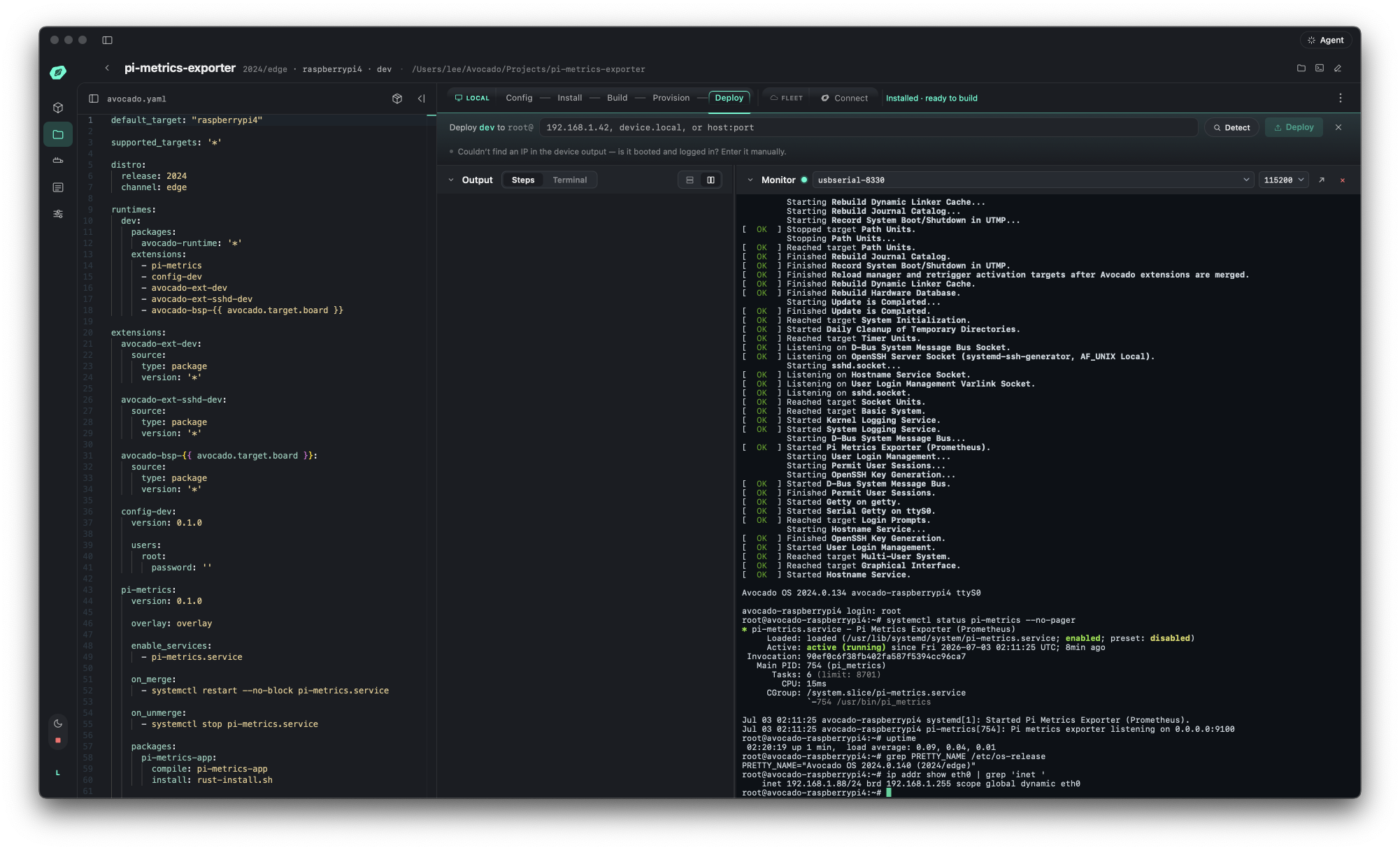
The freshly booted Pi over Avocado Desktop's built-in serial monitor:
pi-metrics.service is active and listening on 0.0.0.0:9100, and
eth0 reports 192.168.1.88 - the same address I curl from my laptop
below.
From my laptop, against the Pi's DHCP address:
$ curl -s http://192.168.1.88:9100/metrics
pi_cpu_temperature_celsius 38.9
pi_memory_total_bytes 8185634816
pi_memory_free_bytes 7969751040
pi_uptime_seconds 106.0
pi_load_average{interval="1m"} 0.05
pi_load_average{interval="5m"} 0.03
pi_load_average{interval="15m"} 0.01

$ curl -s http://192.168.1.88:9100/healthz
ok
Real telemetry from real hardware: 8185634816 bytes is the 8 GB Pi 4, and the uptime tracked the fresh boot.
Issues Encountered
- The agent found its own reference, and that is what made it reliable. I only said "if there are existing Rust references, use them as a guide." The agent cloned the references repo, grepped for Rust, found
rust-vitals, and mirrored its SDK toolchain plus the sysroot.cargoconfig, which is the part of an Avocado Rust build that is easy to get wrong by hand. The takeaway for agentic work: have good references for the agent to discover and let it, rather than hand-specifying the cross-compile. A from-scratch build with no example to anchor on is where these runs tend to wander. - Read what the agent generated before you ship it. The agent is autonomous: it wrote the
avocado.yaml, the Rust, the cross-compile scripts, and a systemd unit, then built and provisioned them onto a device. It worked here, but this is real code and config headed for real hardware, so treat the output like any other change and review it. The upside is that the reference is small enough to read end to end in a couple of minutes.
Reproduce it
Install Avocado Desktop, open its built-in agent, and give it the prompt above. Let it build for raspberrypi4, flash the resulting sd image, boot the Pi, and curl http://<pi-ip>:9100/metrics.
The result is a reference, not a one-off
The chat left behind more than a booted Pi. The project the agent generated is a complete Avocado reference, and it lives in avocado-linux/references as pi-metrics-exporter: the avocado.yaml, the Rust source, the cross-compile scripts, and the systemd unit. You can start a fresh project straight from it:
avocado init --reference pi-metrics-exporter pi-metrics-exporter
That closes a small loop. This run worked because the agent found rust-vitals and followed it, and pi-metrics-exporter now sits in the same repo for the next person's agent to find. One plain-English request produced a reusable starting point, not a throwaway image.