Getting Started
Avocado Connect works with any Avocado OS device. A device connects through a claim token: run avocado connect init in your project to link it to Connect and write a claim token into the device configuration, then build and provision the image. On first boot, the device presents the token, receives its credentials, and starts reporting to Avocado Connect in the right organization and cohort.
Provision and enroll
- Link your project: Sign in with
avocado connect auth login, then runavocado connect initto pick the organization, project, and cohort. It creates a claim token and writes it into your project's device configuration. - Build and provision your device: Run
avocado build, thenavocado provision. When the device first boots, it claims itself with the token and appears in Fleet. - Deploy your first update: Upload a runtime and deploy it to the device's cohort to verify the pipeline end to end before you roll out to the fleet. See Runtimes and Deployments.
Learn by doing
For a guided walkthrough, start with Learn. The First OTA mission takes you from a new project to an over-the-air update on a device connected to Avocado Connect.
Claim tokens
Claim tokens authorize new devices to enroll into a project. Create them on a project's or cohort's Provisioning tab, scope each to a cohort, and cap how many devices a token can claim. avocado connect init also creates one for you.
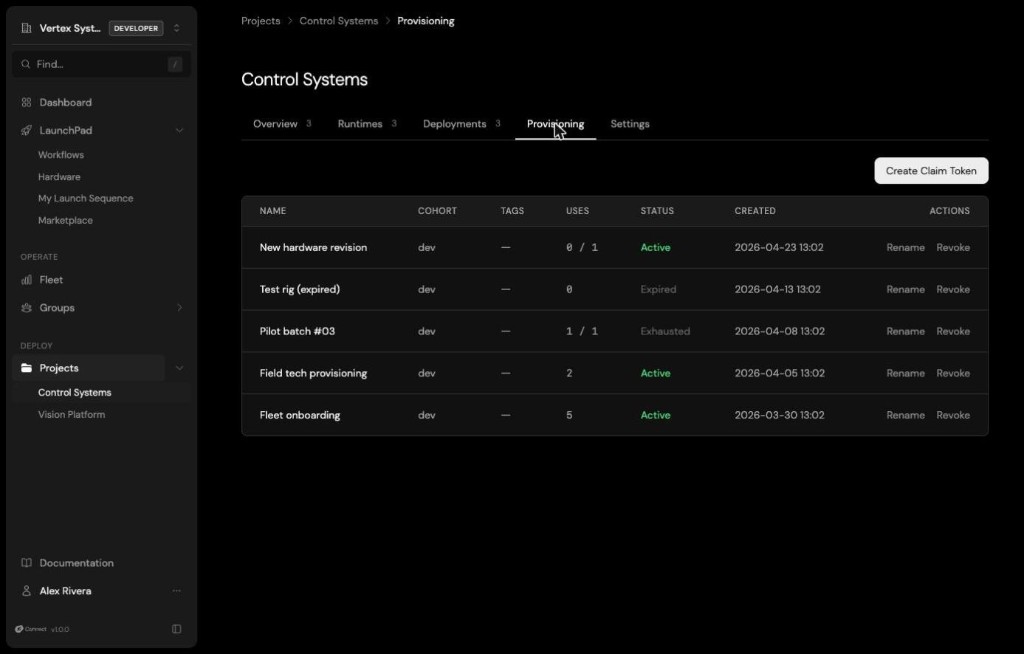
A claim token is a code the device presents on first boot to prove it belongs to your organization. Connect verifies the token, creates the device record, issues the device its credentials, and places it in the token's cohort, with no manual approval step. If a device that's already enrolled claims again, Connect files a reclaim request that an admin approves or denies. Each token tracks how many times it has been used and which devices it claimed, and you can delete a token at any time to revoke it.
Create a claim token
In the console, open a project, go to the Provisioning tab, and click Create Claim Token. Copy the token when it appears: it is shown only once.
From the CLI, sign in first, then create the token:
avocado connect auth login

# Create a token that up to 10 devices can use
avocado connect claim-tokens create --name production-batch-1 --max-uses 10
The CLI prompts for the project and cohort; pass --project <PROJECT_ID> and --cohort <COHORT_ID> to skip the prompts. Tokens expire after one year by default, the Avocado Connect server's default, whether you create them from the console, the CLI, or the API. Omit --max-uses for unlimited uses, pass --no-expiration to keep the token valid indefinitely, and add --tag <TAG> to tag every device that enrolls with it. List and delete tokens with avocado connect claim-tokens list and avocado connect claim-tokens delete --id <TOKEN_ID>.
With the API, claim tokens are created at the organization level and scoped by cohort_id. Without a cohort_id, the token uses your organization's default cohort:
curl -X POST "https://connect.peridio.com/api/orgs/$ORG_ID/claim_tokens" \
  -H "Authorization: Bearer $AVOCADO_TOKEN" \
  -H "Content-Type: application/json" \
  -d '{"claim_token": {"name": "production-batch-1", "cohort_id": "<COHORT_ID>", "max_uses": 10}}'
The response includes the raw token and the claim_url devices use to enroll. List a project's tokens with GET /api/orgs/$ORG_ID/projects/$PROJECT_ID/claim_tokens. See the Provisioning API for every field.
Devices redeem the token by calling POST /api/device/claim on first boot. The Avocado agent does this automatically; you don't need to call it yourself.
Provision devices in manufacturing
avocado connect init writes the claim token to overlay/etc/avocado-conn/config.toml in your project (the overlay of the avocado-ext-connect-config extension), so every device provisioned from that build enrolls itself on first boot. The token it creates has no use limit and doesn't expire. For a production run, create a token for the batch instead, sized with --max-uses and tagged with --tag, and set it as claim_token in that file before you build. Devices land in the right cohort, with the right tags, without anyone touching them.
See Provisioning for provisioning profiles and how to flash devices reliably.