Remote Access
Secure remote access to deployed devices without exposing ports or managing VPNs.
Tunnels create encrypted, authenticated connections between your development machine and a deployed device through Avocado Connect's relay infrastructure. This means you can SSH into a device behind a NAT, firewall, or cellular connection without any inbound port configuration on the device.
- On-demand access: Open a tunnel to any connected device from the console or the API
- Encrypted transport: The device reaches the relay over an authenticated WireGuard connection
- No network configuration: Devices initiate outbound connections to Avocado Connect. No static IPs, port forwarding, or VPN infrastructure required.
- Any TCP service: Reach SSH, a web UI, a debugging tool, or any other service listening on the device
- Temporary by default: Tunnels expire automatically, so access never stays open by accident
- Audit logged: Every tunnel session is recorded: who connected, when, and for how long
For a step-by-step walkthrough — standard ports, custom ports, and a live dashboard example — see the Remote Tunnel guide.
How tunnels work
Tunnels use WireGuard. When you request a tunnel, Connect sends a command to the device over its existing control connection. The device opens an outbound WireGuard connection to the relay, and the relay routes your traffic to the port you chose. Because the device dials out, no inbound ports need to be open on it.
Connect only opens a tunnel to a device that is online and reports itself as tunnel capable. The device's runtime must include the avocado-ext-connect and avocado-ext-tunnels extensions, plus whatever service you want to reach, such as an SSH server for port 22. To turn remote access off for a runtime, remove avocado-ext-tunnels from its avocado.yaml.
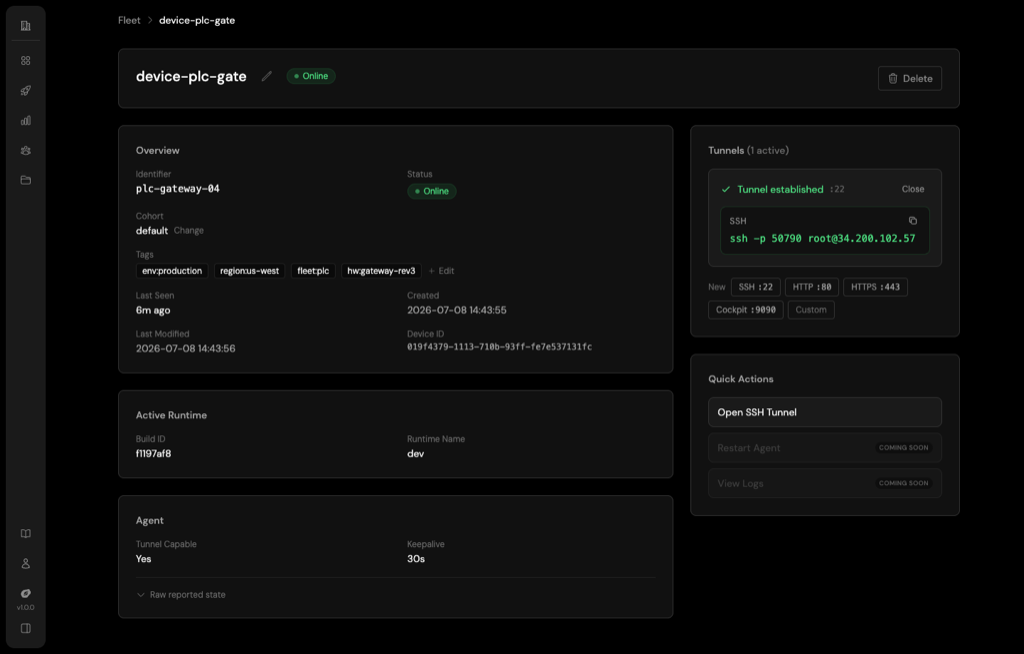
To open a tunnel in the console, go to Fleet, select a device, and use the Tunnels panel on its detail page. Pick a standard port (SSH, HTTP, HTTPS, Cockpit) or choose Custom and enter a port.
Open a tunnel with the API
Open a tunnel by device ID. device_proxy_port is the port on the device you want to reach, for example 22 for SSH. If you leave it out, Connect uses 9090 (Cockpit). Org owners and admins can open a tunnel to any device; other members need access to the device's cohort.
curl -X POST "https://connect.peridio.com/api/orgs/$ORG_ID/tunnels" \
  -H "Authorization: Bearer $AVOCADO_TOKEN" \
  -H "Content-Type: application/json" \
  -d '{"device_id": "<DEVICE_ID>", "device_proxy_port": 22}'
A new tunnel starts in the requested state and moves through device_ack and establishing. Poll GET /api/orgs/$ORG_ID/tunnels/<TUNNEL_ID> until state is established, then connect to relay_endpoint, which stays null until the relay assigns a port. A tunnel that ends is closed, expired, cancelled, or failed, with the cause in failure_reason:
{
  "data": {
    "id": "0198…",
    "state": "established",
    "device_id": "0198…",
    "relay_endpoint": "<host>:<port>",
    "server_proxy_port": 51234,
    "device_proxy_port": 22,
    "expires_at": "2026-…",
    "established_at": "2026-…",
    "failure_reason": null
  }
}
Tunnels opened this way expire after one hour, the longest any tunnel can stay open. List a device's active tunnels with GET /api/orgs/$ORG_ID/devices/<DEVICE_ID>/tunnels, and close one early with DELETE /api/orgs/$ORG_ID/tunnels/<TUNNEL_ID>. See the Remote Access API for every endpoint.
Tunnel policies
Tunnel policies set the rules every tunnel request must follow. Your organization has a default policy, and each cohort can override it:
| Rule | What it controls |
|---|---|
max_ttl_seconds | How long a tunnel stays open when the request sets no expiry (see below) |
backoff_seconds | How long a device waits after a tunnel closes before it can open another |
max_concurrent | How many tunnels a device can have open at once |
cidr_allowlist | Which source IP ranges can connect through the relay |
require_reason | Whether a reason must be given when opening a tunnel |
allowed_windows | Time windows for opening tunnels (not enforced yet, see below) |
A cohort policy can only tighten the organization policy, never loosen it. The shorter TTL, the longer backoff, and the lower concurrency limit win, a reason is required if either side requires one, and a cohort's CIDR allowlist replaces the organization's. A cohort field left unset inherits the organization value. Use this to keep remote access open on bench and development cohorts while restricting it on production.
Keep in mind:
max_concurrentaccepts 1 to 10.max_ttl_secondsandbackoff_secondsaccept up to 86400, but no tunnel stays open longer than one hour, and a request whose expiry falls later is rejected.max_ttl_secondsonly applies to tunnels opened withPOST /api/orgs/$ORG_ID/projects/$PROJECT_ID/cohorts/$COHORT_ID/tunnelsthat don't send anexpires_at. Tunnels opened from Fleet or withPOST /api/orgs/$ORG_ID/tunnelsalways last one hour, whatever the policy says.- Time windows are not enforced yet. Setting any
allowed_windowsentry blocks every tunnel request it applies to, so leave it empty. POST /api/orgs/$ORG_ID/tunnelsdoes not take a reason, so it is rejected whilerequire_reasonis on.
Any member can read the policies. Org owners and admins change them through the API, sending the fields inside a tunnel_policy object to PUT /api/orgs/$ORG_ID/tunnel-policy or PUT /api/orgs/$ORG_ID/projects/$PROJECT_ID/cohorts/$COHORT_ID/tunnel-policy. DELETE on the cohort path clears its overrides.
The number of tunnels your organization can have open at once also depends on your plan. See Billing.