Billing
Billing tracks your organization's plan, usage, and subscription. Every organization starts on the free Developer tier, and you upgrade as your fleet grows. Plans set your member, device, tunnel, claim-token, and tunnel bandwidth limits.
- Current plan and usage: See how many members, devices, tunnels, and claim tokens you're using against your plan's limits
- Upgrade from the Plans tab
- Payment methods and invoices: Manage them in the billing portal
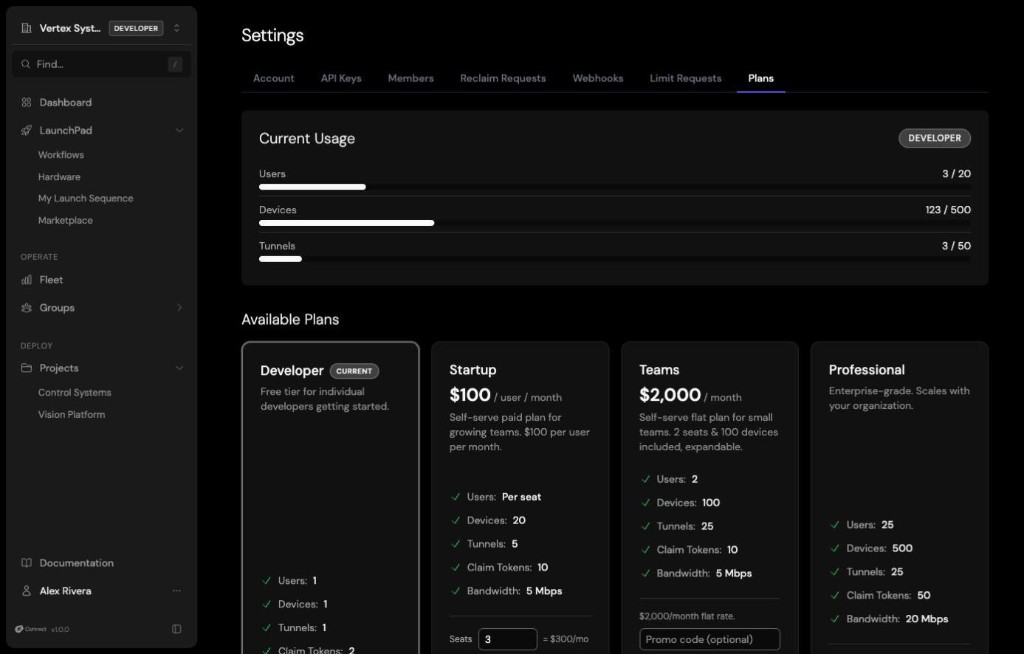
Plan limits
| Plan | Members | Devices | Concurrent tunnels | Claim tokens | Tunnel bandwidth |
|---|---|---|---|---|---|
| Developer | 1 | 1 | 1 | 2 | 1 Mbps |
| Startup | Per purchased seat | 20 | 5 | 10 | 5 Mbps |
| Teams | 2, expandable | 100, expandable | 25 | 10 | 5 Mbps |
| Professional | 25 | 500 | 25 | 50 | 20 Mbps |
| Enterprise | No fixed limit | No fixed limit | No fixed limit | No fixed limit | No fixed limit |
The Developer tier is free and sized for one developer with one device. Tunnels on the Developer tier can't be extended past their initial lifetime. Startup is a paid plan for the first 12 paid months: when it ends, the organization moves back to the Developer tier unless it upgrades to Teams. On Teams, you can add seats and devices beyond what's included from the Plans tab.
Enterprise organizations have no fixed limits. Enterprise isn't available from the Plans tab: to discuss it, contact Peridio.
The Plans tab always shows your organization's current limits. When you reach a limit, Connect blocks the action, for example enrolling another device or sending another invitation, until you upgrade or free up capacity. If you need more on your current plan, an owner or admin can submit a limit increase request from Settings → Limit Requests.
Manage your subscription
Go to Settings → Plans to see your current plan and usage, and to upgrade. Subscribing opens a secure checkout, and Manage billing opens the billing portal, where you update payment methods and view invoices. Every member can see the Plans tab, but only owners and admins can change the subscription.
The billing endpoints are GET /api/orgs/$ORG_ID/billing for the current plan and usage, POST /api/orgs/$ORG_ID/billing/checkout to start a subscription, and POST /api/orgs/$ORG_ID/billing/portal to open the billing portal.