Deployments
Ship a new software version to the right devices, watch it roll out, and know it landed. Deployments in Avocado Connect orchestrate OTA updates across your fleet, targeting a versioned software artifact (a Runtime) published to your project.
Connect builds on the atomic update architecture in Avocado OS: updates apply to A/B partitions and roll back automatically if a boot fails, so a bad update can't brick a device.
Every runtime is signed, and each device verifies the signature before it installs anything. See Code Signing.
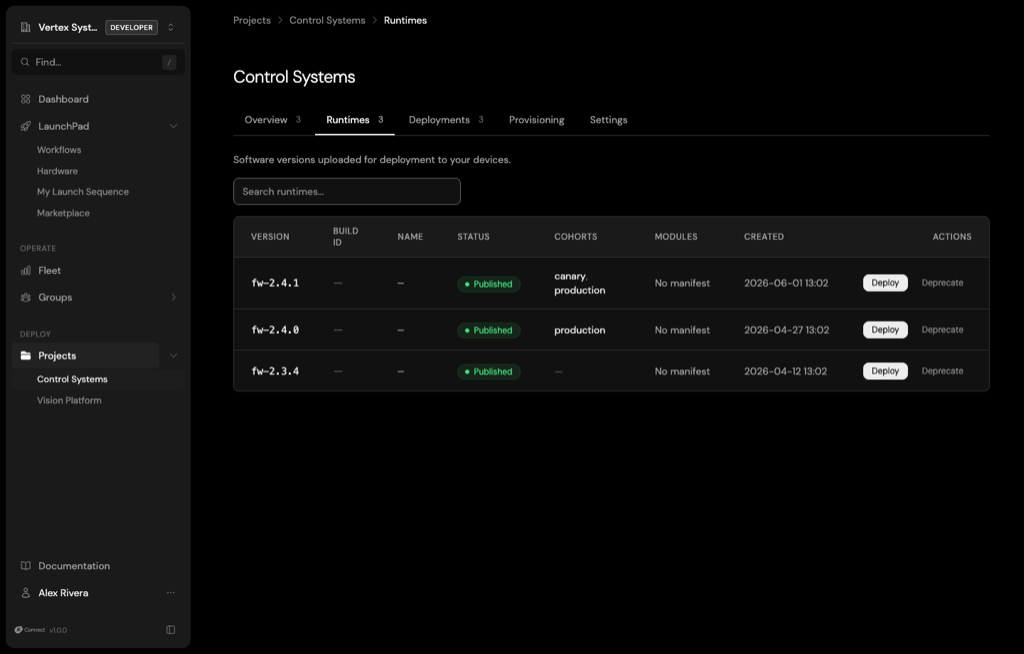
A Runtime is the versioned artifact you deploy. Publish runtimes to your project, assign them to cohorts, and deploy or deprecate them from one place.
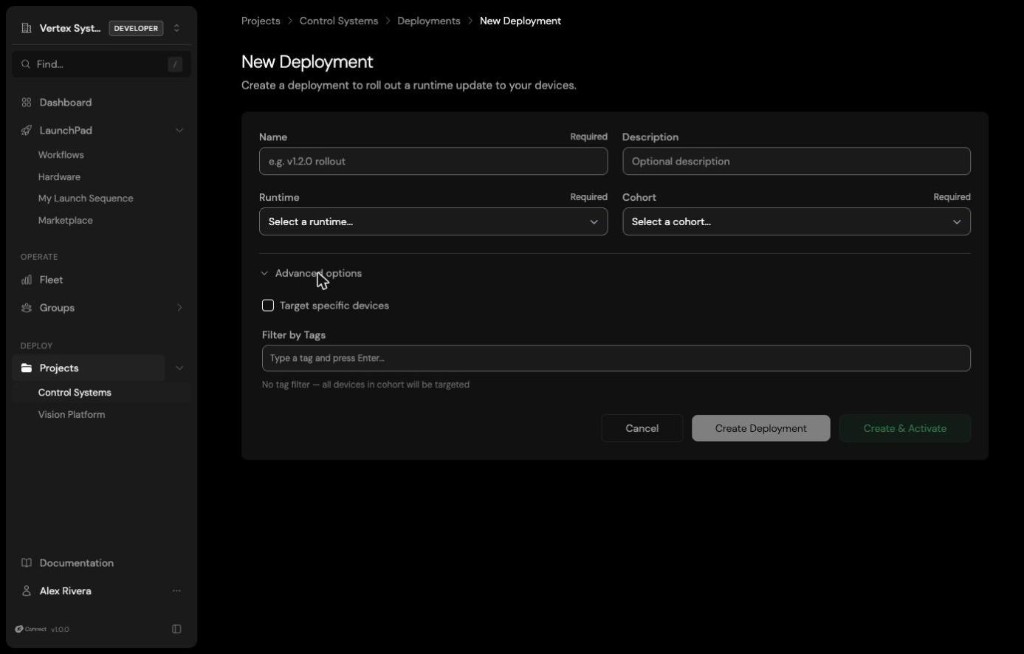
Creating a deployment is a short form: name it, pick the runtime and cohort, and optionally target specific devices or filter by tag under advanced options.
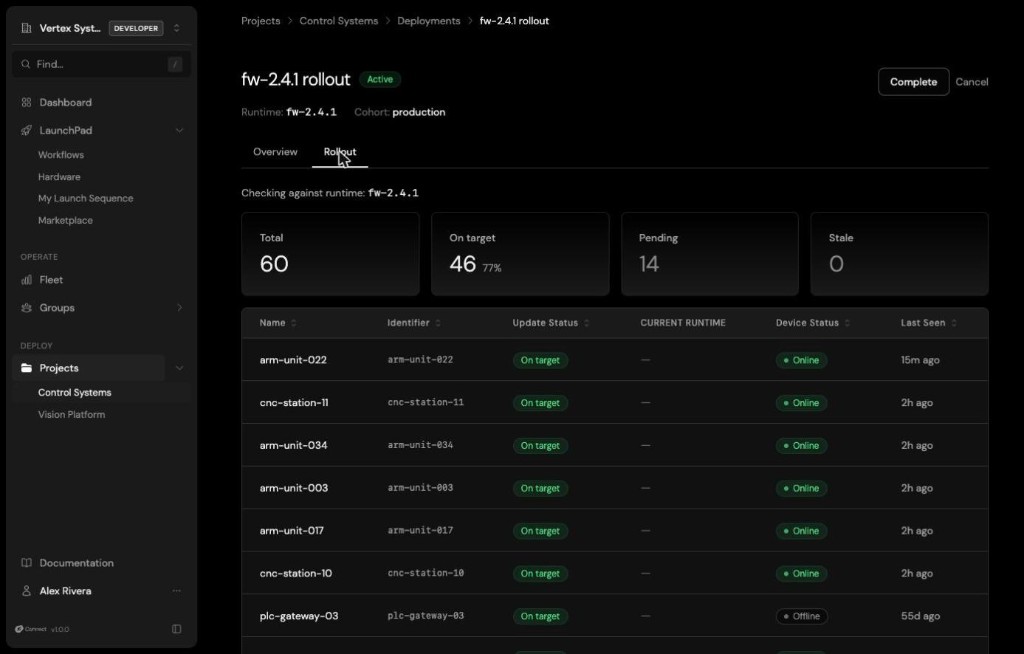
- Staged rollouts: Promote a release through cohorts, for example canary before production, and optionally target specific devices or devices by tag. Convergence tracking reports on-target percentage, pending devices, and stale device counts so you can see exactly how far a rollout has progressed before promoting it further.
- Cohort and tag targeting: Push updates to specific device groups: update a factory pilot line without touching production, or roll out to one region first. Tag and specific-device targeting let you reach exactly the devices you mean.
- Delta updates: Avocado OS and its update agent transmit only the changed bytes rather than a full image, which Connect builds on. This is critical over metered cellular or satellite links. See atomic updates for how the underlying mechanism works.
- Audit trail: Every deployment records what was deployed, when, to which devices, and the outcome, giving you a complete history of how your fleet reached its current state.
Cohorts
A cohort is a named group of devices within a project that shares a deployment target. A deployment pairs one runtime with one cohort, so only the devices in that cohort receive the update. Segment your fleet into cohorts by deployment stage, for example:
development: Devices on your bench during active development.beta-testers: Early adopters who run pre-release software.production: Your stable fleet, with tighter access and remote-access rules.
Create cohorts from a project's Overview tab, or with avocado connect cohorts create. Devices join a cohort when they enroll with a claim token scoped to it (see Claim tokens). To move a device to another cohort in the same project, change its cohort from the device's detail view in Fleet.
Each cohort also carries its own:
- Deployment history: Every rollout that targeted the cohort.
- Access rules: Restrict who can see and deploy to the cohort. See Access Control.
- Tunnel policy: Tighten remote-access rules for the cohort, for example a lower concurrency limit or a required reason on production. See Tunnel policies.
Staged rollouts
Stage a release by deploying it to a small cohort first. Deploy the runtime to beta-testers, verify it there, then deploy the same runtime to production. Problems surface on a handful of devices instead of your whole fleet. To roll back, deploy the previous runtime version to the cohort.
Create a deployment from the CLI or API
From your project directory, deploy a published runtime to a cohort. Without --activate, the deployment is created as a draft you can review and activate in the console:
avocado connect deploy --runtime <RUNTIME_ID> --cohort <COHORT_ID> --activate
Omit --runtime or --cohort to pick them interactively. Add --tag <TAG> to deploy only to devices with that tag.
With the API, name, runtime_id, and cohort_id are required:
curl -X POST "https://connect.peridio.com/api/orgs/$ORG_ID/projects/$PROJECT_ID/deployments" \
  -H "Authorization: Bearer $AVOCADO_TOKEN" \
  -H "Content-Type: application/json" \
  -d '{"deployment": {"name": "v1.2.0-beta", "runtime_id": "<RUNTIME_ID>", "cohort_id": "<COHORT_ID>"}}'
A new deployment starts as a draft. The response includes its id, status, rollout_percentage, and targeting fields. See the Deployments API for the full object and the update, cancel, and per-device endpoints, and the First OTA mission for an end-to-end walkthrough.