NXP FRDM i.MX 93
Dual Cortex-A55 + Cortex-M33 heterogeneous platform with Ethos U-65 NPU, EdgeLock secure enclave, and industrial connectivity for edge AI applications.
imx93-frdm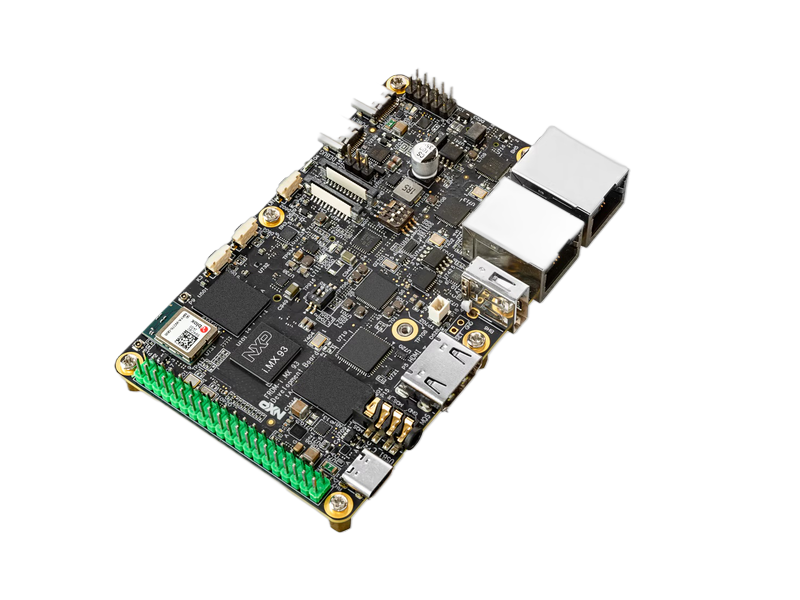
- 1.7 GHzDual Cortex-A55
- 0.5 TOPSEthos U-65 NPU
- 2GBLPDDR4X Memory
- Cortex-M33250 MHz Real-Time Core
- GbE + CAN FDIndustrial Connectivity
- -40 to 85°CIndustrial Temperature
Overview
The NXP FRDM i.MX 93 development platform, enhanced with Avocado Linux and Avocado Connect, delivers a production-ready heterogeneous computing solution for edge AI applications. This integrated platform combines dual Cortex-A55 application processors, a Cortex-M33 real-time core, and an Ethos U-65 NPU to enable sophisticated edge processing with 0.5 TOPS of AI performance. The pre-integrated Linux and RTOS environment eliminates months of complex multi-core development, while EdgeLock security and atomic OTA updates ensure enterprise-grade deployment from prototype to production. Teams can leverage industrial connectivity options including CAN FD and Gigabit Ethernet to build secure, scalable edge AI systems that operate reliably in -40°C to +85°C environments with 10+ years of platform support.
Specifications
| Specification | Value | Notes |
|---|---|---|
| Applications CPU | Dual Cortex-A55 @ 1.7GHz | 64-bit ARM v8.2-A architecture |
| Real-time CPU | Cortex-M33 @ 250MHz | Dedicated real-time processing |
| AI Accelerator | Ethos U-65 NPU | 0.5 TOPS for edge AI inference |
| Memory | 2GB LPDDR4X | 16GB eMMC storage included |
| Connectivity | Gigabit Ethernet, CAN FD, USB 3.0 | Industrial and automotive interfaces |
| Operating Temp | -40°C to +85°C | Industrial temperature range |
Use Cases
Edge AI Vision Systems
Real-time object detection and classification with Ethos U-65 NPU. Process camera streams locally with low latency for industrial inspection.
Industrial HMI Controllers
Rich graphical interfaces on Cortex-A55 with real-time control on Cortex-M33. Heterogeneous processing for responsive industrial control panels.
Smart IoT Gateways
Bridge OT and IT networks with secure EdgeLock enclave. Local AI processing reduces cloud dependency and improves response times.
Challenges and Solutions
| Challenge | Solution |
|---|---|
| Complex heterogeneous architecture setup | Pre-integrated Linux + RTOS system |
| Linux and RTOS integration challenges | Optimized NPU drivers and frameworks |
| NPU optimization requires expertise | Secure OTA for both cores |
| Security configuration complexity | EdgeLock security pre-configured |
| Long development cycles for edge AI | Production-ready in weeks not months |
Key Features
Heterogeneous Processing
Seamless Linux on Cortex-A55 with RTOS on Cortex-M33. Pre-configured inter-core communication for optimal workload distribution.
Edge AI Acceleration
Ethos U-65 NPU with optimized TensorFlow Lite and ONNX runtime. Hardware acceleration for computer vision and anomaly detection.
EdgeLock Security
Hardware root of trust with secure enclave. Secure boot, encrypted storage, and runtime attestation built-in.
Dual-OS Fleet Management
Unified OTA updates for Linux and RTOS partitions. Coordinate updates across heterogeneous cores with rollback protection.
Industrial Linux Stack
Yocto-based Linux with real-time patches. Pre-integrated industrial protocols and containerization support.
Multi-Core Analytics
Monitor both application and real-time cores. Track AI inference performance and system health metrics.
Security features
The published i.MX 93 feed builds every security capability this SoC can deliver; each one is opted into per runtime in avocado.yaml, with no distro rebuild.
| Capability | Status on imx93-frdm |
|---|---|
Encrypted /var | Built. Key derived from the SoC UID today; the EdgeLock (ELE) backend is pending |
| Signed boot FIT | Built. U-Boot re-packed with your key, and a saved-environment permit list |
| Rootfs dm-verity | Built. Root hash carried in the signed FIT |
| Extension dm-verity | Built |
| AHAB boot container | Built as a feed feature: EdgeLock authenticates SPL, ATF and U-Boot against SRK fuses |
rootfs:
  image:
    verity: true

runtimes:
  prod:
    var:
      encrypt: true
      recovery: fleet-var-master
    signing:
      fit_key: product-fit
AHAB is applied when the feed is built rather than from avocado.yaml, because it signs the boot container the ROM loads. Signing does not close the part — an OPEN device boots a signed image without checking it, which is the window to validate in before burning SRK fuses. See Boot signing.
imx91-frdm carries the AHAB wiring too; it does not declare encrypted /var or verified boot yet.
Getting Started
The NXP FRDM i.MX 93 guide walks through the whole path for this board: prerequisites, the serial console, building, provisioning to an SD card, first boot, and running your own container so that it comes back after a power cycle.
avocado init --target imx93-frdm imx93-frdm
cd imx93-frdm
avocado install
avocado build
avocado provision -r dev --profile sd
Insert the SD card, connect the USB-C cable, and apply power. The root user is passwordless in the dev runtime.