NXP i.MX 8M Plus
Production-ready industrial IoT and vision systems with 2.3 TOPS NPU, dual cameras, and real-time processing.
imx8mp-evk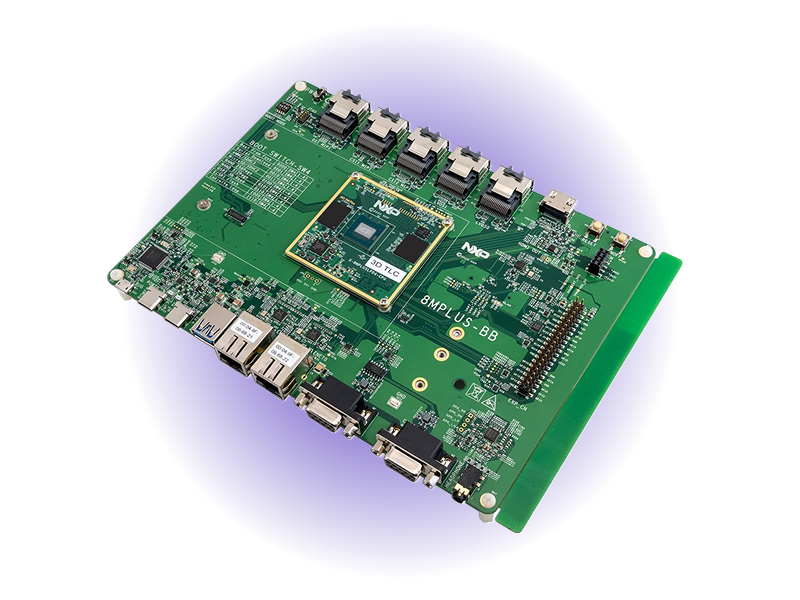
- 2.3 TOPSNPU Performance
- Dual MIPI CSICamera Inputs
- -40 to 85°CIndustrial Temperature
- Quad Cortex-A532.0 GHz Application CPUs
- Cortex-M7800 MHz Real-Time Core
- Dual GbE + TSNIndustrial Networking
Overview
The NXP i.MX 8M Plus, powered by Avocado Linux and Avocado Connect, delivers the ideal platform for industrial vision and edge AI applications requiring real-time processing and neural network acceleration. With 2.3 TOPS of NPU performance, dual MIPI CSI camera interfaces, and a dedicated Cortex-M7 real-time core, this solution enables sophisticated computer vision workloads at the edge without cloud dependency. The pre-integrated multi-core Linux and RTOS environment streamlines development of complex vision systems, while TSN-enabled Gigabit Ethernet ensures deterministic networking for synchronized multi-camera deployments. Built for -40°C to +85°C operation with enterprise OTA and fleet management, the platform transforms months of custom integration into a production-ready vision system that scales from prototype to thousands of units.
Specifications
| Specification | Value | Notes |
|---|---|---|
| NPU | 2.3 TOPS AI Acceleration | On-device ML without cloud dependency |
| CPU | Quad Cortex-A53 @ 2.0 GHz | Application processors for Linux workloads |
| Real-Time Core | Cortex-M7 @ 800 MHz | Dedicated real-time control processing |
| Camera Support | Dual MIPI CSI @ 12MP/375MP/s | Stereo vision and multi-camera processing |
| Networking | Dual GbE (one with TSN) | Time-sensitive industrial networking |
| Operating Temp | -40°C to +85°C | Industrial and harsh environments |
Use Cases
Smart Industrial Camera
Dual-camera stereo vision with real-time inference for defect detection and classification. NPU accelerates ResNet/YOLO models at the edge.
Autonomous Inspection System
Low-latency TSN-based Gigabit connection enables synchronized multi-sensor deployments with persistent vision monitoring.
Voice-Controlled Industrial Gateway
Audio streaming and voice recognition via HiFi 4 DSP with wake-word detection handled on-chip for operator assistance.
Challenges and Solutions
| Challenge | Solution |
|---|---|
| Complex multi-core integration (A53 + M7) | Pre-integrated multi-core support |
| NPU optimization for vision workloads | Optimized NPU drivers and ML runtime |
| Dual camera synchronization | Synchronized camera pipeline |
| Real-time processing requirements | Deterministic real-time performance |
| Industrial-grade reliability needs | Industrial-grade OS and fleet management |
Key Features
Industrial-Grade OS
Avocado OS provides deterministic builds optimized for industrial applications with secure boot and verified boot capabilities.
Dual Camera Vision
Supports dual MIPI CSI cameras at up to 12MP/375MP/s for stereo vision, multi-angle capture, or simultaneous RGB+IR processing.
NPU AI Acceleration
2.3 TOPS of on-device AI acceleration enables real-time vision and ML workloads without relying on cloud compute.
Real-Time Processing
Cortex-M7 real-time core at 800 MHz handles latency-sensitive tasks like motor control and sensor polling.
TSN Networking
Time-sensitive networking with dual Gigabit Ethernet supports deterministic control and multi-device synchronization.
Long-Term Support
10-15 year availability with enterprise maintenance ensures supply stability for long-lived industrial products.
Security features
The published i.MX 8M Plus feed builds every security capability this SoC can deliver; each one is opted into per runtime in avocado.yaml, with no distro rebuild.
| Capability | Status on imx8mp-evk |
|---|---|
Encrypted /var | Built. Key bound to a CAAM black key, stored in the LUKS2 header |
| Signed boot FIT | Built. U-Boot re-packed with your key, so the first flash enforces it |
| Rootfs dm-verity | Built. Root hash carried in the signed FIT |
| Extension dm-verity | Built |
| Bootloader OTA (eMMC) | Built. boot0/boot1 coupled to the OS slots, with rollback |
rootfs:
  image:
    verity: true

runtimes:
  prod:
    var:
      encrypt: true
      hardware: caam
    signing:
      fit_key: product-fit
See Security features for the full workflow, including the operator-held /var recovery key and boot signing.
Getting Started
Init, Install, & Build
Follow the Any Supported Target instructions under Getting Started to begin. This target is imx8mp-evk. The provisioning specifics are below.
Provision
Build the project and execute the provisioning procedure. This will build the system image and flash it to your target hardware. You need a microSD card (8GB+) and an SD card reader on the host.
If your Linux desktop auto-mounts removable media, disable it first — see Linux Auto-Mounting.
avocado build
avocado provision -r dev --profile sd
Run
After provisioning completes, insert the SD card into your target device and power it on.
The device will boot from the SD card with the provisioned system. The root user is passwordless in the dev runtime used by this guide.