NXP i.MX 93 EVK
Dual Cortex-A55 + Cortex-M33 heterogeneous platform with Ethos U-65 NPU, EdgeLock secure enclave, and modular connectivity for edge AI applications.
imx93-evk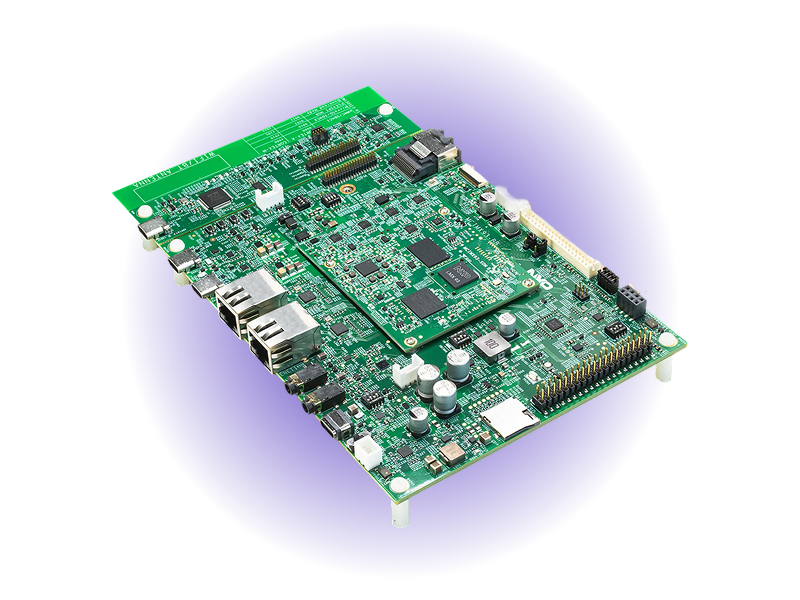
- 1.7 GHzDual Cortex-A55
- 0.5 TOPSEthos U-65 NPU
- 2GBLPDDR4X Memory
- Cortex-M33200 MHz Real-Time Core
- Wi-Fi 6 + BT 5.2Tri-Radio Connectivity
- EdgeLockSecure Enclave
Overview
The NXP i.MX 93 Evaluation Kit, paired with Avocado OS, delivers a production-ready heterogeneous computing platform for edge AI and industrial applications. The modular design separates the compute module (i.MX 93 SoC, 2GB LPDDR4X, 16GB eMMC) from the connectivity base board, enabling flexible deployment configurations. Dual Cortex-A55 cores at 1.7GHz handle Linux application workloads, a dedicated Cortex-M33 core runs real-time tasks, and the Ethos U-65 NPU provides 0.5 TOPS of AI inference. With Wi-Fi 6, BT 5.2, MIPI DSI/CSI, and EdgeLock security, this platform covers the full spectrum of edge AI use cases — from vision systems to industrial HMI controllers.
Specifications
| Specification | Value | Notes |
|---|---|---|
| Applications CPU | Dual Cortex-A55 @ 1.7GHz | 64-bit ARMv8.2-A architecture |
| Real-time CPU | Cortex-M33 @ 200MHz | Dedicated real-time processing |
| AI Accelerator | Ethos U-65 NPU | 0.5 TOPS for edge AI inference |
| Memory | 2GB LPDDR4X | On compute module |
| Storage | 16GB eMMC | MicroSD slot available |
| Wireless | Wi-Fi 6 + BT 5.2 + 802.15.4 | NXP IW612 tri-radio via M.2 Key-E |
| Display | MIPI DSI, LVDS | Backlight connector included |
| Camera | MIPI CSI | Direct camera input |
| Connectivity | Gigabit Ethernet, USB 2.0/C, Audio | ADC, I2C, PDM MIC, JTAG |
| Security | EdgeLock Secure Enclave | Secure boot, crypto, tamper detection |
Use Cases
Edge AI Vision Systems
Real-time object detection and classification with Ethos U-65 NPU. Process MIPI CSI camera streams locally with low latency for industrial inspection.
Industrial HMI Controllers
Rich graphical interfaces via MIPI DSI on Cortex-A55 with real-time control on Cortex-M33. Heterogeneous processing for responsive industrial panels.
Smart IoT Gateways
Bridge OT and IT networks with EdgeLock security. Wi-Fi 6 and tri-radio connectivity with local AI processing to reduce cloud dependency.
Challenges and Solutions
| Challenge | Solution |
|---|---|
| Complex heterogeneous architecture setup | Pre-integrated Linux + RTOS system |
| NPU optimization requires expertise | Optimized TensorFlow Lite and ONNX runtime |
| Multi-core update coordination | Atomic OTA for both cores with rollback |
| Security configuration complexity | EdgeLock security pre-configured |
| Long development cycles for edge AI | Production-ready in weeks not months |
Key Features
Heterogeneous Processing
Seamless Linux on Cortex-A55 with RTOS on Cortex-M33. Pre-configured inter-core communication for optimal workload distribution.
Edge AI Acceleration
Ethos U-65 NPU with optimized TensorFlow Lite and ONNX runtime. Hardware acceleration for computer vision and anomaly detection.
Modular Design
Separate compute module and base board. Prototype on the EVK, deploy on a custom carrier board with the same software stack.
EdgeLock Security
Hardware root of trust with secure enclave. Secure boot, encrypted storage, and runtime attestation built-in.
Tri-Radio Connectivity
Wi-Fi 6, Bluetooth 5.2, and 802.15.4 on a single M.2 module. Connect to any wireless ecosystem without additional hardware.
Production Hardening
Avocado OS provides immutable root filesystem, atomic A/B updates, and long-term support. Ship to production with confidence.
Getting Started
Init, Install, & Build
Follow the Any Supported Target instructions under Getting Started to begin. This target is imx93-evk. The provisioning specifics are below.
Provision
Build the project and execute the provisioning procedure. This will build the system image and flash it to your target hardware.
If your Linux desktop auto-mounts removable media, disable it first — see Linux Auto-Mounting.
avocado build
avocado provision -r dev --profile sd
Run
After provisioning completes, insert the SD card into your target device and power it on.
The device will boot from the SD card with the provisioned system. The root user is passwordless in the dev runtime used by this guide.