Jetson Orin Nano DK
Production-grade software for the industry's leading AI edge hardware. Deploy NVIDIA Jetson Orin Nano fleets from day 1 with deterministic Linux, secure OTA, and fleet management.
jetson-orin-nano-devkit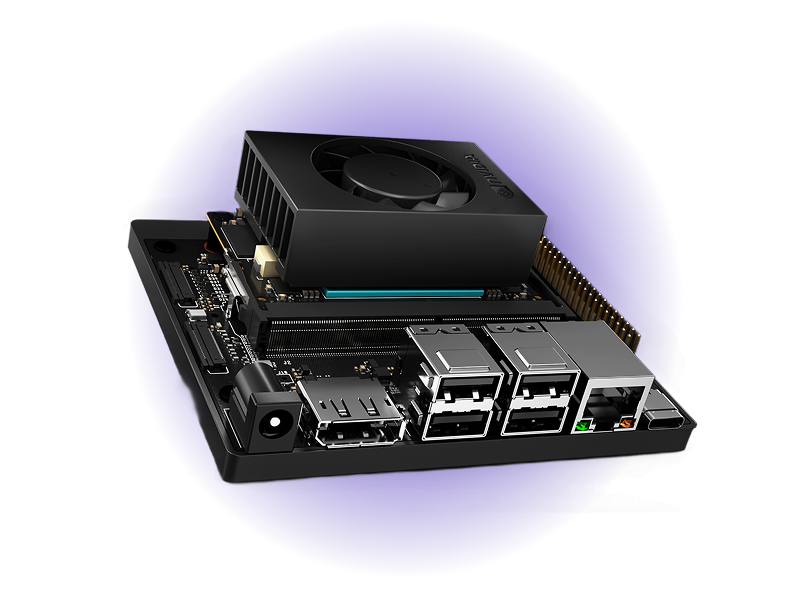
- Day 1Production Ready
- 10+ YearsLong-Term Support
- 67 TOPSAI Performance
- 1024-coreAmpere GPU
- Up to 8GBLPDDR5 Memory
- -40 to 70°CIndustrial Operating Range
Overview
The NVIDIA Jetson Orin Nano represents the pinnacle of AI edge computing hardware, delivering 67 TOPS of performance in an efficient, compact form factor. When paired with Avocado Linux and Avocado Connect, this industry-leading platform gains the production-grade software infrastructure it deserves. Teams can accelerate their time to market with enterprise Linux, atomic OTA updates, and fleet management built in from day one. This powerful combination enables you to fully leverage Jetson's exceptional AI capabilities while our integrated platform handles the complex infrastructure requirements. The result is a secure, scalable edge AI solution that matches Jetson's hardware excellence with enterprise-grade software, backed by 10+ years of support and cross-platform portability across the entire NVIDIA Jetson family.
Specifications
| Specification | Value | Notes |
|---|---|---|
| AI Performance | 67 TOPS (8GB) / 34 TOPS (4GB) | Up to 142x performance of Jetson Nano |
| GPU | 1024/512-core NVIDIA Ampere GPU | CUDA-X and TensorRT for real-time inference |
| CPU | 6-core Arm Cortex-A78AE @ 1.7 GHz | Armv8.2 64-bit with safety features |
| Memory | 8GB/4GB LPDDR5 | 102/51 GB/s bandwidth for multi-sensor vision |
| Power | 7-25W | Scalable to battery-powered devices |
| Operating Temperature | -40°C to +70°C | Rugged industrial environments |
Use Cases
Industrial Smart Cameras
Multi-camera CSI input for AI tasks like object detection and quality inspection. OTA supports model updates in production.
Autonomous Mobile Robots
Real-time sensor fusion and navigation processing. Avocado OS supports ROS2 and containers with scalable fleet rollouts.
Edge AI Gateways
Run generative AI or LLMs locally with NVMe and optional 10-GbE. Managed Linux keeps them secure in harsh environments.
Challenges and Solutions
| Challenge | Solution |
|---|---|
| Developer kits aren't production-ready | Production-ready OS in minutes |
| Custom Yocto builds require significant time investment | Pre-integrated Jetson BSPs |
| OTA infrastructure requires dedicated teams | Enterprise OTA orchestration |
| Security compliance adds complexity | Built-in security compliance |
| Fleet management built from scratch | Managed fleet operations |
Key Features
Rapid Deployment
Boot deterministic Linux on Jetson in minutes. Hardware-in-the-loop tools reduce iteration from weeks to hours.
Production Security
Secure boot, dm-verity, and LUKS encryption across all architectures. Reproducible images simplify certification.
Fleet Management
Register and manage devices in Avocado Connect. Phased releases, cohort targeting, SBOM, and CVE patching.
Composable Architecture
Build systems using modular layers and standard secure components. Avoid the fragility of DIY Yocto.
Cross-Platform
Reuse Avocado OS layers across ARM/NPU SoCs (Qualcomm Rubik Pi 3, MediaTek Genio, NXP i.MX8MP).
Long-term Support
10+ years of kernel/security maintenance. Combined with Jetson's industrial lifecycle ensures device longevity.
Security features
The published Jetson feed builds encrypted /var for every Jetson target; it is opted into per runtime in avocado.yaml, with no distro rebuild.
| Capability | Status |
|---|---|
Encrypted /var | Built. LUKS2 key sealed to the OP-TEE fTPM against PCR 7, with an Argon2id fallback |
| Signed boot FIT | Not applicable - Jetson boots the NVIDIA chain, not a U-Boot FIT |
| Rootfs dm-verity | Not available - Jetson has no U-Boot FIT to carry the root hash, and the stone manifests carry no per-slot hash partitions |
| Extension dm-verity | Built. extensions.<name>.image.verity is manifest-carried, so it works here too |
| Recovery key | Built. Operator-held master, per-unit passphrase enrolled with avocado var-key enroll |
initramfs:
  packages:
    avocado-pkg-initramfs: '*'
    optee-ftpm-init: '*'

runtimes:
  prod:
    var:
      encrypt: true
      hardware: tpm2
      recovery: fleet-var-master
The OP-TEE fTPM that hardware: tpm2 binds to is opt-in on Jetson: the machine definitions do not install it by default. Without optee-ftpm-init in initramfs.packages the initramfs has no TEE supplicant and no persistent fTPM store, so tpm2 fails closed and auto falls back to the Argon2id key. With it, the store is formatted on the first boot and the TPM keeps its identity across reboots. That was checked on a Jetson AGX Orin: the endorsement key and the storage root key were the same after a reboot, and the lockout counter stayed at 0. Sealing /var to the fTPM, and a power cycle while the store is in use, were not part of that check.
The first boot encrypts the flashed /var in place, so seeded content - subvolumes, var_files, primed Docker images - survives. See Encrypted /var.
Getting Started
Init, Install, & Build
Follow the Jetson Orin Nano Getting Started guide to begin. This target is jetson-orin-nano-devkit. The provisioning specifics are below.
Provision
The Jetson is provisioned over USB using NVIDIA's tegraflash tooling, which runs inside the Avocado SDK container. You need an NVMe SSD (M.2 2280 form factor) installed in the developer kit and a USB-C cable from your host to the Jetson's USB-C port.
Put the board into USB recovery mode before provisioning. With the device powered off, short the FC REC pin to GND with a jumper, connect the USB-C cable, and apply power. Running lsusb on the host shows an entry containing NVIDIA Corp. APX when the device is in recovery mode. See Boot into recovery mode for details.
avocado build
avocado provision -r dev --profile tegraflash
Run
After provisioning completes, remove power from the Jetson, remove the jumper shorting FC REC to GND, remove the USB-C cable, and apply power.
The device will boot with the provisioned system. The root user is passwordless in the dev runtime used by this guide.