Jetson AGX Thor
Production-grade software for NVIDIA's flagship robotics supercomputer. Deploy Jetson AGX Thor fleets with deterministic Linux, secure OTA, and fleet management — built for physical AI.
jetson-agx-thor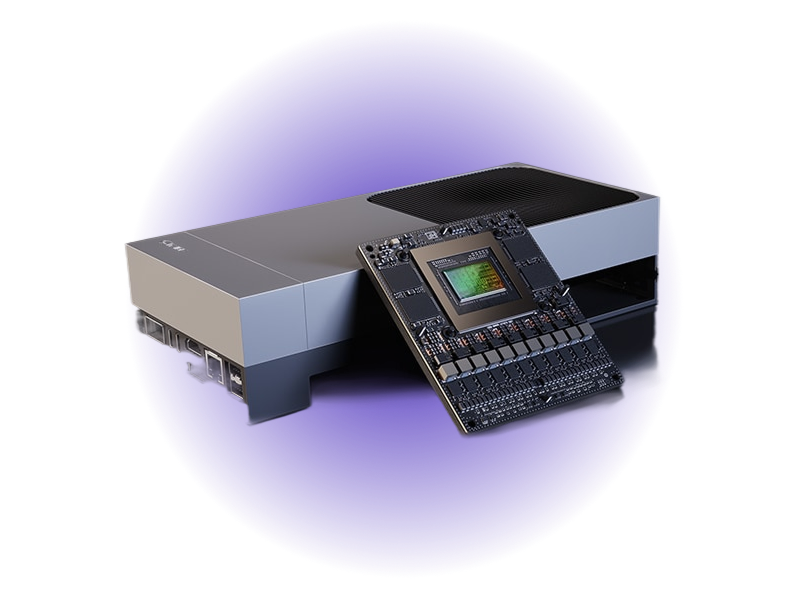
- 2070 TFLOPSFP4 AI Performance
- Blackwell2560-core GPU
- 14-coreArm Neoverse-V3AE CPU
- 128GBLPDDR5X Memory
- PCIe Gen5High-Speed I/O
- 40-130WConfigurable Power
Overview
The NVIDIA Jetson AGX Thor is the flagship Jetson module, delivering 2070 FP4 TFLOPS — 7.5x the AI performance of AGX Orin at 3.5x better efficiency. Built on the Blackwell GPU architecture with a 14-core Arm Neoverse-V3AE CPU, it includes 128GB LPDDR5X memory, PCIe Gen5, 16x CSI-2 camera lanes, and 4x25GbE networking. It is the definitive platform for humanoid robotics, autonomous systems, and next-generation physical AI. Paired with Avocado OS and Avocado Connect, Thor gains the production-ready software foundation — enterprise Linux, atomic OTA updates, and fleet management — required for mission-critical deployments at scale.
Avocado OS supports the Jetson AGX Thor on the 2026 release.
Specifications
| Specification | Value | Notes |
|---|---|---|
| CPU | 14-core Arm Neoverse-V3AE | |
| GPU | 2560-core Blackwell, 96 Tensor Cores | |
| AI Performance | 2070 FP4 TFLOPS / 1035 FP8 TFLOPS | Sparse; 1035 / 517 TFLOPS dense |
| Memory | 128GB LPDDR5X (273 GB/s) | |
| Storage | PCIe Gen5 NVMe | 1TB in dev kit |
| Video Decode | Up to 10x 4Kp60 or 4x 8Kp30 | H.265, H.264, AV1, VP9 |
| Video Encode | Up to 6x 4Kp60 | H.265, H.264 |
| Camera | 16x CSI-2 lanes, 20+ cameras | |
| Networking | QSFP 4x25GbE + RJ45 Multi-GbE | |
| Power | 40-130W configurable |
Use Cases
Humanoid Robotics
Real-time reasoning for general-purpose robotic platforms, with the headroom to run large vision-language-action models on-device.
Autonomous Machines
Multi-sensor fusion for autonomous vehicles and mobile machines, with deterministic Linux and secure OTA for the field.
Edge AI Servers
Large-model inference (LLMs, VLMs) in industrial and medical settings, managed across a fleet with Avocado Connect.
Security features
The published Jetson feed builds encrypted /var for every Jetson target; it is opted into per runtime in avocado.yaml, with no distro rebuild.
| Capability | Status |
|---|---|
Encrypted /var | Built. LUKS2 key sealed to the OP-TEE fTPM against PCR 7, with an Argon2id fallback |
| Signed boot FIT | Not applicable - Jetson boots the NVIDIA chain, not a U-Boot FIT |
| Rootfs dm-verity | Not available - Jetson has no U-Boot FIT to carry the root hash, and the stone manifests carry no per-slot hash partitions |
| Extension dm-verity | Built. extensions.<name>.image.verity is manifest-carried, so it works here too |
| Recovery key | Built. Operator-held master, per-unit passphrase enrolled with avocado var-key enroll |
initramfs:
  packages:
    avocado-pkg-initramfs: '*'
    optee-ftpm-init: '*'

runtimes:
  prod:
    var:
      encrypt: true
      hardware: tpm2
      recovery: fleet-var-master
The OP-TEE fTPM that hardware: tpm2 binds to is opt-in on Jetson: the machine definitions do not install it by default. Without optee-ftpm-init in initramfs.packages the initramfs has no TEE supplicant and no persistent fTPM store, so tpm2 fails closed and auto falls back to the Argon2id key. With it, the store is formatted on the first boot and the TPM keeps its identity across reboots. That was checked on a Jetson AGX Orin: the endorsement key and the storage root key were the same after a reboot, and the lockout counter stayed at 0. Sealing /var to the fTPM, and a power cycle while the store is in use, were not part of that check.
The first boot encrypts the flashed /var in place, so seeded content - subvolumes, var_files, primed Docker images - survives. See Encrypted /var.
Getting Started
Init, Install, & Build
Follow the Any Supported Target
instructions under Getting Started to begin. This target is jetson-agx-thor,
available on the 2026 release feed. The provisioning specifics are below.
Connect the Cables
Provisioning flashes the Jetson over USB while it is powered by USB-C PD and held in Force Recovery Mode. The connectors are on the I/O side of the developer kit — see the NVIDIA Jetson AGX Thor Developer Kit hardware layout for the full reference.
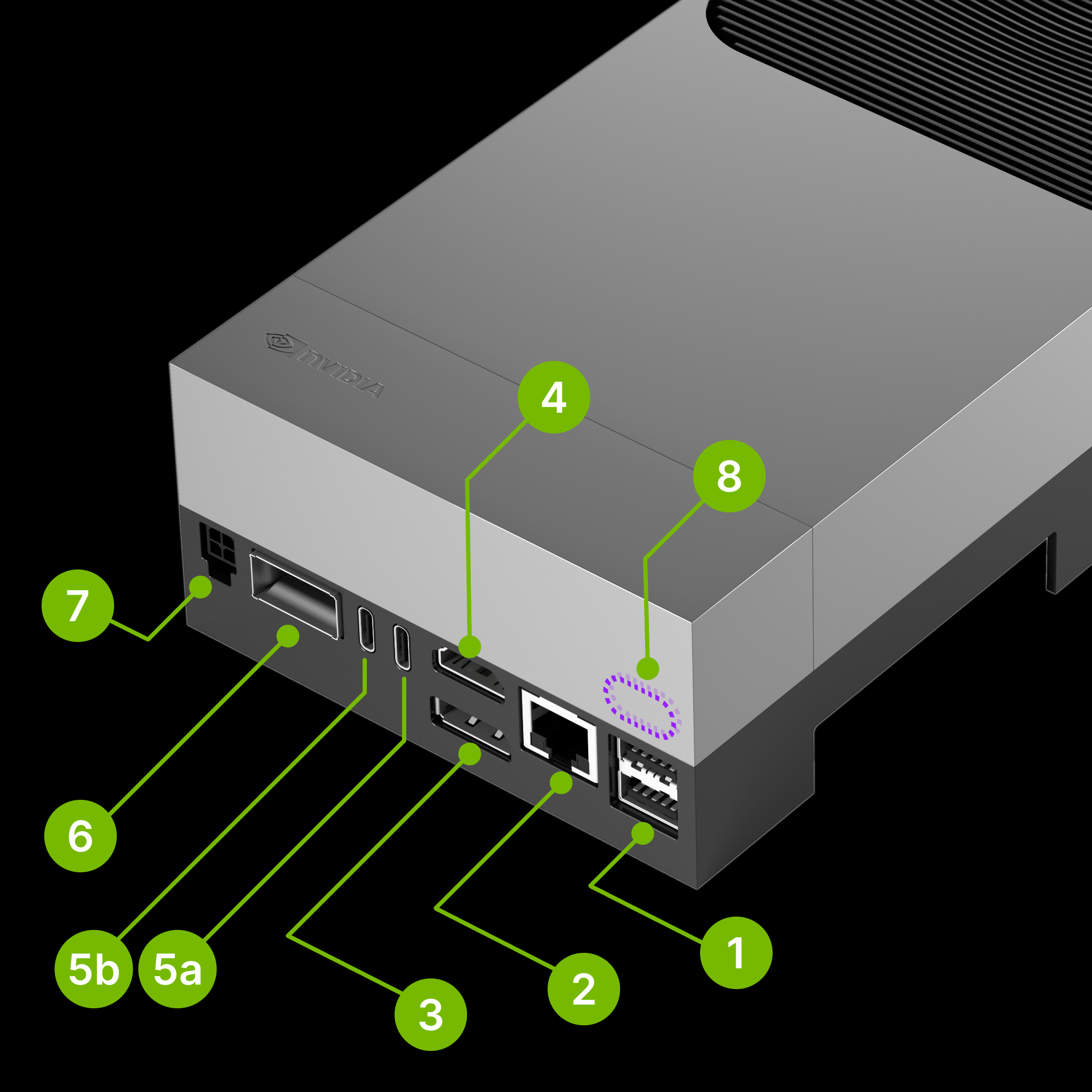
- Connect the included USB-C power supply to the power USB-C port (5b). The Jetson is powered over USB-C PD during flashing.
- Connect a USB-C cable from your host to the flashing USB-C port (5a) — the port that supports Force Recovery Mode.
- Optional: for console access, connect a USB-C cable from your host to the debug port (8), located behind the lid cover.
Enter Force Recovery Mode
The buttons are on the front edge of the developer kit: Power (11), Force Recovery (12), and Reset (13).
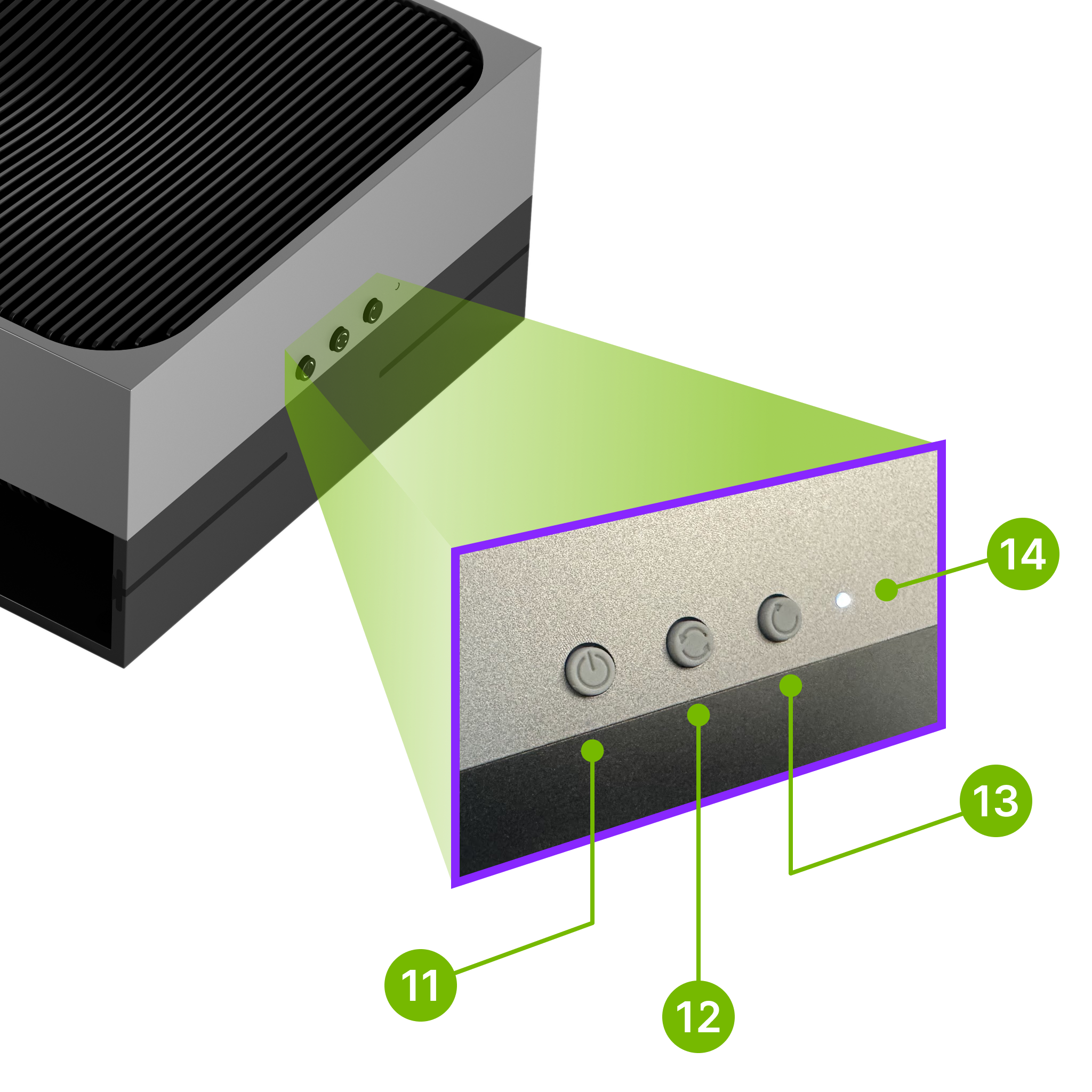
- Press and hold both the Force Recovery button (12) and the Reset button (13) for 3 seconds.
- Release the Reset button (13) only, keeping the Force Recovery button held.
- After a further 3 seconds, release the Force Recovery button (12).
You don't need to verify this manually — the Avocado CLI and Avocado Desktop detect whether the Jetson is in Force Recovery Mode and report it when you provision.
Provision
Build the project and flash it to the target:
avocado build
avocado provision -r dev --profile tegraflash
Run
Disconnect the flashing USB-C cable from 5a, then power-cycle the device by
unplugging and reconnecting the USB-C power supply at 5b. It will boot with
the provisioned system. The root user is passwordless in the dev runtime used
by this guide. Keep the debug USB-C cable on 8 for console access, or SSH in
once the device is on the network.