NXP i.MX 95 FRDM
Six Cortex-A55 cores with Cortex-M7 and Cortex-M33 real-time cores and an eIQ Neutron NPU, on an immutable Linux with atomic A/B updates.
imx95-frdm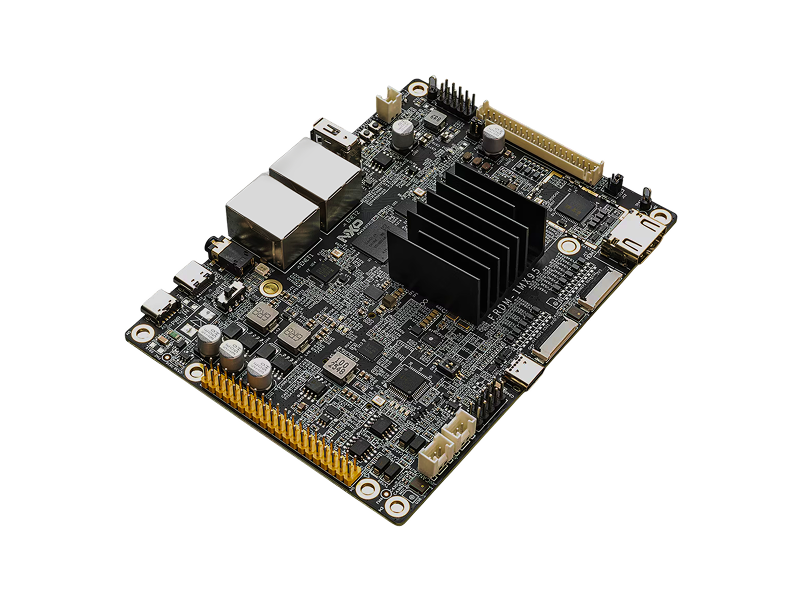
- 6x A55Cortex-A55 Cores
- M7 + M33Real-Time Cores
- eIQ NeutronNPU
- 8GBLPDDR4X Memory
- 32GBeMMC 5.1 Storage
- 2x GbEEthernet
Overview
The NXP i.MX 95 FRDM is a development board for the i.MX 95 applications processor. The processor has six Cortex-A55 cores, a Cortex-M7, a Cortex-M33, and an eIQ Neutron NPU.
On the 2026 release, Avocado OS builds this board from the NXP meta-imx
layer for Linux 6.18. On the i.MX 95, the U-Boot version must match the
System Manager firmware. Avocado OS uses U-Boot 2026.04, the version that NXP
releases with this firmware.
The target is imx95-frdm, available on the 2026 release feed.
Specifications
| Specification | Value | Notes |
|---|---|---|
| SoC | NXP i.MX 95 | 15 mm x 15 mm package |
| CPU | 6x Cortex-A55 | |
| Real-time | 1x Cortex-M7, 1x Cortex-M33 | |
| NPU | NXP eIQ Neutron NPU | |
| Memory | 8GB LPDDR4X-4000 | |
| Storage | 32GB eMMC 5.1, microSD slot | |
| Ethernet | 2x GbE RJ-45 | |
| CAN | 2x CAN header | TJA1051 transceiver |
| USB | 1x USB 3.0 Type-C, 1x USB 2.0 Type-A | |
| Display | MIPI-DSI, LVDS, HDMI (from LVDS) | |
| Camera | 2x MIPI-CSI (FPC 22-pin) | One shares its lanes with MIPI-DSI |
| Wireless | IW612 M.2 module | Wi-Fi 6, Bluetooth 5.4, 802.15.4 |
| Debug console | USB-C (J1), 115200 baud | A WCH chip gives four serial ports |
Boot Switch
SW1 positions 1 and 2 select the boot device. By default, the board boots
from the eMMC.
| Boot device | SW1-1 | SW1-2 |
|---|---|---|
| Serial downloader | OFF | ON |
| eMMC | ON | OFF |
| microSD card | ON | ON |
Getting Started
Init, Install, & Build
Follow the Any Supported Target
instructions under Getting Started. This target is imx95-frdm.
avocado init --target imx95-frdm imx95-frdm
cd imx95-frdm
avocado install
avocado build
Connect the Serial Console
Connect the debug port J1 to the host with a USB-C cable. The board gives
four serial ports. One of these ports is the Linux console on the Cortex-A55.
Open each port at 115200 baud until you see the Linux boot log:
ls /dev/serial/by-id/
tio -b 115200 /dev/ttyACM0
Provision
Avocado OS supports two ways to provision this board: a microSD card (sd
profile) and the onboard eMMC over USB (uuu-emmc profile).
microSD Card
-
Put a microSD card in a card reader on the host.
-
Write the image to the card:
Host machineavocado provision dev --profile sd -
Make sure that the board is powered off.
-
Set
SW1-1to ON andSW1-2to ON to boot from the microSD card. -
Put the card in the board.
-
Connect a USB PD power supply to
J25.
eMMC
The uuu-emmc profile writes the image to the eMMC over USB, with the board in
serial downloader mode.
-
Make sure that the board is powered off.
-
Set
SW1-1to OFF andSW1-2to ON to select serial downloader mode. -
Connect the
USB1port (J3) to the host with a USB cable. -
Connect a USB PD power supply to
J25. -
Write the image to the eMMC:
Host machineavocado provision dev --profile uuu-emmcThe command waits up to 60 seconds for the board to appear in serial downloader mode. It then writes the image and the bootloader to the eMMC.
-
Power off the board.
-
Set
SW1-1to ON andSW1-2to OFF to boot from the eMMC. -
Disconnect the
USB1cable. -
Connect power to
J25.
Run
The board boots Avocado OS from the media that you provisioned. The root user is
passwordless in the dev runtime used by this guide. Log in on the serial
console, or use SSH when the device is on the network.