Seeed reTerminal
Production-Ready Yocto Linux for reTerminal in Days, Not Months. Build industrial HMI applications with the security and scalability of Yocto, plus the rapid development cycles your team needs.
reterminal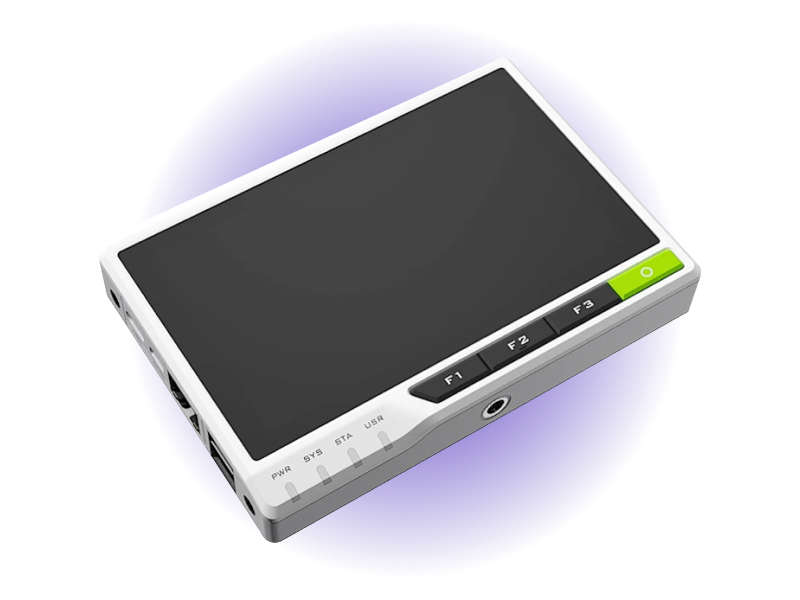
- 5"IPS Touchscreen
- 1.5 GHzQuad-Core ARM (CM4)
- IP64Front Panel Rating
- <30sCold Boot to UI
- 1000+Fleet Scalability
- 7 YearsAvocado OS LTS
Overview
Avocado OS gives teams the ability to build production-grade applications on the Seeed reTerminal with the security and scalability guarantees provided by Yocto Linux, but with the immediate feedback loops that developers need. Start building UIs and application code in under 10 minutes with our turnkey development environment - no months of BSP configuration or toolchain setup required. This complete platform combines the Raspberry Pi CM4's computing power with production-hardened Linux, atomic OTA updates, and enterprise fleet management. Deploy your first device in days, not months, while maintaining the deterministic behavior and long-term support essential for industrial applications. Whether you're building machine interfaces, building automation systems, or edge AI applications, Avocado OS and Peridio transform the reTerminal from a development board into a production-ready platform that scales from prototype to thousands of devices.
Specifications
| Specification | Value | Notes |
|---|---|---|
| Processor | Raspberry Pi CM4 | Quad-core Cortex-A72 @ 1.5GHz |
| Display | 5-inch IPS LCD | 1280x720, 10-point multi-touch |
| Memory | 2/4/8GB LPDDR4 | Up to 32GB eMMC storage |
| Connectivity | WiFi 5 + BT 5.0 | Gigabit Ethernet, dual USB |
| Expansion | 40-pin GPIO | Compatible with reTerminal E10-1 modules |
| Operating Temp | 0°C to +50°C | Industrial-grade components |
Use Cases
Machine Control Interface
Real-time PLC Integration with responsive multi-touch interface. Optimized UI rendering for smooth operator interactions. Native Modbus RTU/TCP, OPC UA, and MQTT support through Avocado OS.
Building Automation
Multi-site HVAC/BMS deployment with centralized management. Deploy identical HMI configurations across facilities with group-based fleet management. Node-RED visual programming with pre-built automation blocks.
Edge IoT Gateway
Process 10,000+ sensor messages/sec at the edge with local data aggregation and filtering. LoRaWAN and Zigbee expansion modules for wireless sensor networks. Real-time visualization with sub-second latency.
Challenges and Solutions
| Challenge | Solution |
|---|---|
| Weeks to configure each HMI manually with custom SD card images | Deploy 100s of HMIs in hours with zero-touch provisioning |
| No rollback when UI updates fail in production | Atomic updates with instant rollback on failure |
| Consumer-grade OS unsuitable for 24/7 industrial operation | Industrial Linux with real-time kernel and 7-year support |
| Custom BSP development for each deployment scenario | Pre-integrated BSP with optimized display drivers out-of-the-box |
| No centralized visibility across distributed HMI fleets | Single dashboard for monitoring and managing entire fleet |
Key Features
Avocado OS - Production Linux for reTerminal
Deterministic Yocto Linux optimized for reTerminal and Raspberry Pi CM4. Pre-integrated Qt 6, Flutter, and LVGL UI frameworks. Wayland compositor optimized for IPS multi-touch display performance.
Day 1 Production Ready
Skip months of BSP development with pre-integrated Raspberry Pi CM4 support. Optimized drivers for the IPS multi-touch display and wireless connectivity. Real-time kernel patches for deterministic performance in industrial environments.
Enterprise Security & Compliance
Secure boot chain from bootloader to application. Encrypted storage with TPM 2.0 support. SBOM generation for supply chain compliance. Kiosk mode with lockdown policies for operator terminals.
Fleet-Scale Operations
Manage 1000+ reTerminals from a single dashboard. Phased rollouts with automatic rollback on failure. Group-based configuration for site-specific settings. Real-time health monitoring and alerting.
Industrial Protocol Suite
Native Modbus RTU/TCP with optimized response times. OPC UA server/client with security profiles. MQTT 5.0 with QoS and retained messages. Pre-built Node-RED flows for common automation patterns.
Developer Acceleration
Hardware-in-the-loop development reduces iteration from weeks to hours. Remote debugging with full stack traces. Performance profiling for UI and system optimization. Cross-compilation SDK for CI/CD pipelines.
Getting Started
Init, Install, & Build
Follow the Any Supported Target instructions under Getting Started to begin. This target is reterminal. The provisioning specifics are below.
Provision
Build the project and execute the provisioning procedure. This will build the system image and flash it to your target hardware.
If your Linux desktop auto-mounts removable media, disable it first — see Linux Auto-Mounting.
avocado build
avocado provision -r dev --profile sd
Run
After provisioning completes, insert the SD card into your target device and power it on.
The device will boot from the SD card with the provisioned system. The root user is passwordless in the dev runtime used by this guide.