OnLogic FR201
Transform your OnLogic FR201 from development platform to production gateway with enterprise-grade Linux deployment.
fr201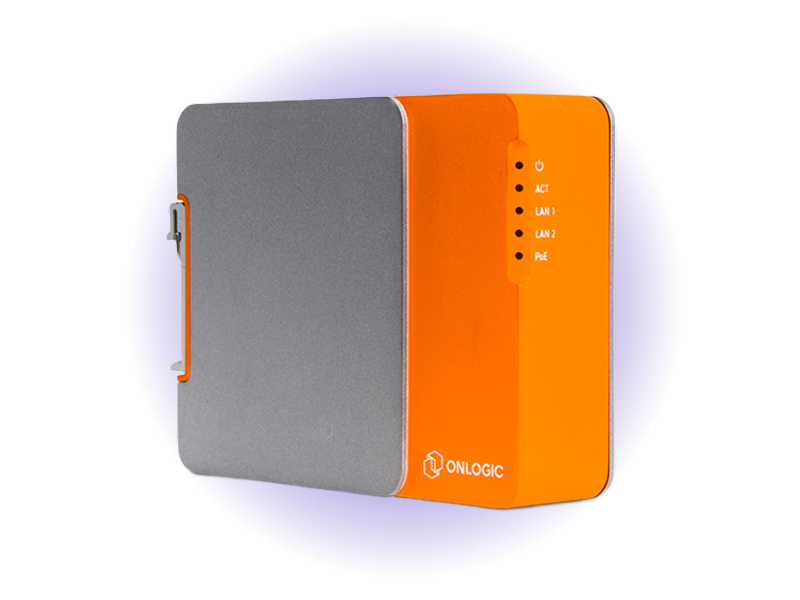
- FanlessSilent Operation
- -20 to 60°CWide Temperature Range
- 6x FasterTime to Production
- Quad-coreBCM2711 Cortex-A72 (CM4)
- Up to 8GBLPDDR4-3200 Memory
- Dual GbERedundant Networking
Overview
OnLogic's FR201, powered by Avocado Linux and Avocado Connect, becomes a production-ready gateway platform with enterprise-grade OTA updates and centralized fleet management. This partnership addresses hardware obsolescence, helps right-size deployments for optimal ROI, and supports a wide range of industrial use cases from manufacturing to transportation. Together, OnLogic and Peridio enable secure, scalable edge infrastructure that can move from prototype to large-scale deployment in weeks instead of months. The result is a proven hardware-software foundation designed to operate for years with 99.9% uptime and automatic rollback protection.
Specifications
| Specification | Value | Notes |
|---|---|---|
| Processor | Raspberry Pi CM4 - Broadcom BCM2711 Cortex-A72 (ARM v8) | Quad-core 64-bit ARM processor for efficient protocol handling |
| Memory | Up to 8GB LPDDR4-3200 | High-bandwidth memory for data buffering and processing |
| Storage | eMMC (up to 32GB) + M.2 SATA (up to 2TB) | Dual storage options for OS and data separation |
| Networking | Dual GbE LAN + Optional WiFi 802.11ac | Redundant connectivity with wireless backup |
| I/O Expansion | USB 3.2, 2x USB 2.0, RS-232/422/485, GPIO | Industrial-grade connectivity for sensors and equipment |
| Operating Temp | -20°C to +60°C | Fanless operation in harsh industrial environments |
Use Cases
Factory Data Aggregation
Consolidate data from PLCs, sensors, and SCADA systems. Process and filter industrial protocols before cloud transmission with built-in security.
Remote Site Management
Manage distributed industrial equipment with secure remote access tunnels. Monitor system health and perform maintenance without site visits.
Protocol Bridge Gateway
Convert between industrial protocols (Modbus, OPC-UA, CAN) and modern APIs. Enable legacy equipment integration with cloud platforms.
Challenges and Solutions
| Challenge | Solution |
|---|---|
| 18-month custom Linux builds for production deployment | Production-ready in weeks with pre-built industrial BSPs |
| Manual on-site updates that don't scale across sites | Atomic OTA updates with automatic rollback protection |
| Complex integration of industrial protocols and security | Built-in protocol support for Modbus, OPC-UA, and CAN |
| Vendor lock-in with proprietary gateway solutions | Cross-platform deployment - same software, any hardware |
| No remote diagnostics when systems fail in the field | Enterprise remote diagnostics with secure tunnel access |
Key Features
Production-Ready from Day One
Pre-hardened Linux OS with read-only root filesystem, secure boot, and atomic updates. No prototype-to-production gap.
Atomic Update Architecture
Zero-downtime updates with automatic rollback on failure. System integrity guaranteed with cryptographic verification and watchdog protection.
Industrial-Grade Fleet Management
Deploy and manage thousands of gateways across industrial sites. Site-specific configurations with centralized policy enforcement.
Cross-Platform Portability
Develop on FR201, deploy across industrial hardware. Unified toolchain prevents vendor lock-in and reduces engineering overhead.
Enterprise Security
TPM 2.0 integration, full-disk encryption, and certificate-based authentication. Zero-trust architecture built for industrial environments.
Hardware-Optimized Performance
Thermal management optimizations for fanless operation. Automatic resource allocation and workload distribution for 24/7 uptime.
Getting Started
Init, Install, & Build
Follow the Any Supported Target instructions under Getting Started to begin. This target is fr201. The provisioning specifics are below.
Provision
Build the project and execute the provisioning procedure. This will build the system image and flash it to your target hardware.
If your Linux desktop auto-mounts removable media, disable it first — see Linux Auto-Mounting.
avocado build
avocado provision -r dev --profile usb
Run
After provisioning completes, remove the USB drive, insert it into the target device, and power it on.
The device will boot with the provisioned system. The root user is passwordless in the dev runtime used by this guide.